
The most expensive sentence in freelancing is “oh, I thought that was included.” You quote $3,500 for a brand package; four weeks later the client wants “just a quick” packaging design, three extra revision rounds, and a rush turnaround — none of it in writing. You either eat 20 unpaid hours or have the awkward fight.
It’s not just a feeling: 44% of freelancers say a client has stiffed them, and 37% of those blame vague contracts. A scope of work (SOW) is the document that decides whether you get paid for the work you actually do.
An AI scope of work generator for freelancers drafts that document from a plain-English brief. I ran the same $3,500 brand-identity brief through four of them: ChatGPT’s free guest mode wrote the most complete SOW — 13 sections with kill-fee and change-order clauses. Template.net was the most contract-complete dedicated tool but watermarks free downloads. Taskip was the best truly-free option with clean PDF export. QuillBot was fast and free but too thin to protect you.
In this guide you’ll find…
- Hands-on tests of 4 AI scope of work generators — ChatGPT, Template.net, Taskip, QuillBot — on the same $3,500 freelance brief, with real screenshots
- A side-by-side comparison table: price, signup needs, which protective clauses each wrote (and skipped)
- The 4 things every AI SOW gets wrong — and the fix for each
- A copy-paste clause bank: 6 lines that stop scope creep
- The exact prompt I used — generate your own SOW in two minutes
TL;DR — the quick version
- Best overall: ChatGPT’s free guest mode. No login, and the most complete SOW — exclusions, acceptance criteria, change-order clause, kill-fee terms. It even flagged its own judgment calls.
- Best dedicated tool: Template.net — real cancellation terms and IP clauses, but free downloads carry a watermark, 5 free generations max, and I caught AI glitches needing proofreading.
- Best truly free: Taskip. No signup, no watermark, clean PDF/DOCX export, real signature block. Weaker on change-order and kill-fee language.
- Skip QuillBot for this job. Fast and free (a free account is now required), but no exclusions, no acceptance criteria, no protective clauses at all.
- Whatever you use, apply the 4 fixes below. No AI tool writes a send-ready SOW on the first pass.
Your scope of work is a money document, not paperwork
Most freelancers treat the SOW like admin — something dashed off after the proposal wins the work. Flip it: the proposal sells the project; the SOW keeps the project profitable.
Here’s the math. Your $3,500 brand package takes 40 hours — $87.50 an hour, decent. Then the client adds “a few extras” never in writing: two more revision rounds (8 hours), a packaging concept (6), rush chaos (6 more). Now 60 hours for the same $3,500 — your rate dropped to $58 an hour. Preventable with six paragraphs.
A SOW that protects your money needs seven things:
- Deliverables with exact format and quantity — “3 logo concepts, 1 finalized logo as SVG, EPS, PNG, JPG” — not “logo design.”
- A timeline with real dates — milestones, not “about four weeks.”
- A revision limit with a price for extras — “2 rounds included; additional rounds at $X.”
- Payment terms — amounts, dates, and late-payment consequences.
- Exclusions — what is explicitly not included. The anti-scope-creep clause most freelancers skip.
- Acceptance criteria — what “done” looks like, so the client can’t move the goalposts.
- Change-order and cancellation terms — how new work gets priced, and what you’re owed if the project dies halfway.
That’s the checklist I scored every tool against. If a generator can’t produce all seven, it’s a drafting toy, not a contract tool.

How we tested
Our methodology
- Same brief, every tool. A brand identity package for a fictional coffee shop (“Copper Cup”): 3 logo concepts, 1 finalized logo, a 10-page brand guidelines PDF, 20 social templates. 4 weeks from November 2, 2026. $3,500 fixed — 50% upfront, 50% on delivery. 2 revision rounds.
- Scored on the 7-section checklist above, plus: really free? signup needed? what can you export? did it invent anything weird?
- Tested October 15, 2026, in a regular browser — the way you’d use these tools. No vendor demos, no affiliate deals.
- One honest failure: I planned to test Perplexity too (I’m signed in there), but its prompt box kept breaking — the editor re-rendered on every attempt, ~15 tries. I used ChatGPT’s guest mode as the chatbot representative instead.
- Not legal advice. I’m a freelancer who tests tools, not a lawyer. For high-value projects, get an attorney to review your SOW. (We’re the FreelancerTools Team — we test AI tools so you don’t learn the hard way.)
The 4 tools, tested head-to-head
1. ChatGPT (free guest mode) — the best SOW I got
This surprised me. I expected a dedicated tool to beat a chatbot. It didn’t.
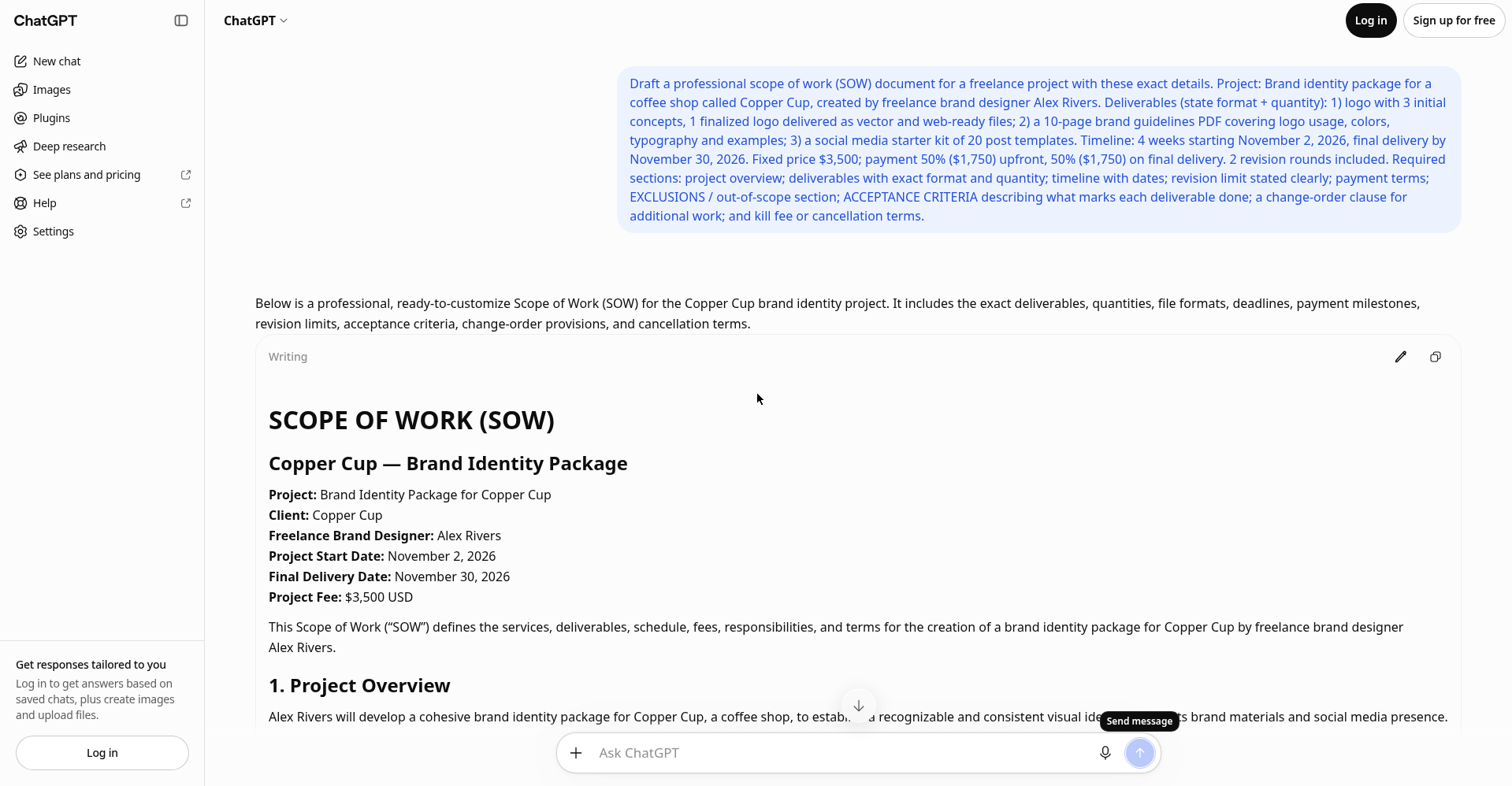
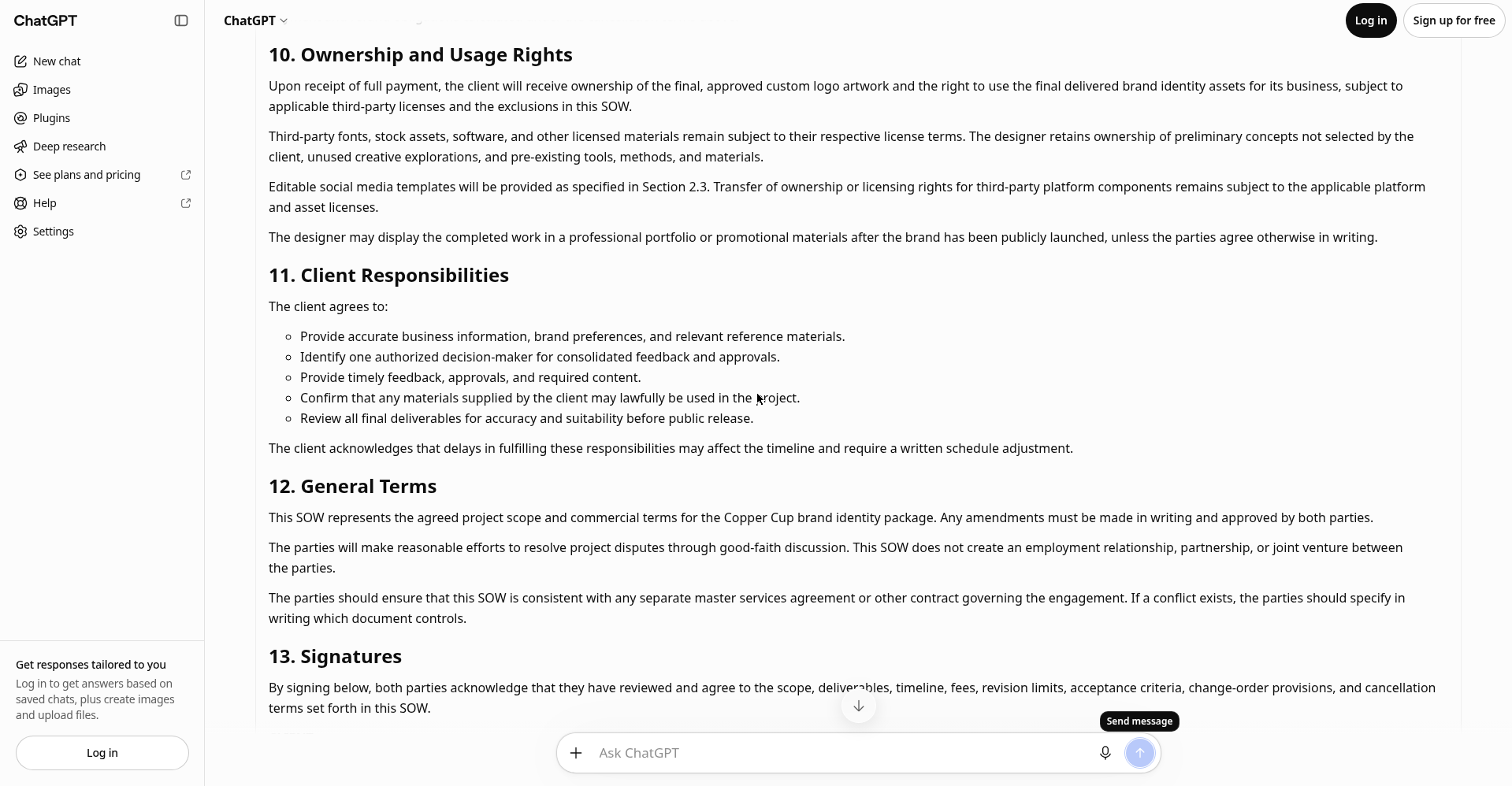
I opened chatgpt.com without logging in — guest mode worked, one dismissible login nudge. I pasted a detailed prompt (full version near the end) and got a 13-section SOW: deliverables with formats and quantities, weekly timeline, revision limits, 50/50 payment table, 12 exclusions, acceptance criteria per deliverable, change-order clause, kill-fee terms, ownership rights, client responsibilities, signature block.
Catch: export is copy-paste only. But it was internally consistent — and it flagged its own judgment calls, including the $500 kill fee it proposed. An AI that shows its guesses beats one that hides them. As a free starting point with zero signup, nothing else came close.
Verdict: best overall. Start here.
2. Template.net — the most contract-complete tool, with caveats
Template.net’s AI SOW generator produced the most contract-heavy output of any dedicated tool: 12 sections including a real change-order clause, cancellation terms with a $1,750 non-refundable deposit, ownership rights, and a signature table. Closest to what a lawyer would draft.
Three caveats. Free downloads carry a Template.net watermark — a watermarked contract looks amateur. 5 free generations max. And I caught AI glitches: “N calendar days” placeholders left unfilled, one sentence mixing up who pays whom. Proofread every line — a glitch in a contract is a liability, not a typo.
Verdict: most contract-complete dedicated tool, but a draft engine — not a one-click solution.
3. Taskip — the best truly-free dedicated generator
Taskip’s scope of work generator was the pleasant surprise. No signup, no watermark, and PDF and DOCX downloads — the formats clients expect. Five output languages too, handy for international clients.
The structure was contract-grade: parties, objectives, deliverables, success criteria (what “done” looks like), a phased timeline with exact dates, budget, assumptions and exclusions (printing, web dev, copywriting, photography — the things clients try to sneak in), acceptance with a signature block and 5-business-day window.
Missing: no formal change-order clause and no kill-fee terms — add those from the clause bank below. Note: Taskip sells paid project software, but the SOW tool itself is genuinely free.
Verdict: best truly-free dedicated tool. A clean, sendable SOW in five minutes.
4. QuillBot — fast, free, and too thin
QuillBot’s AI SOW generator (inside QuillBot’s AI chat) was the fastest and free, though it now asks you to create a free account before generating. It kept every number from my brief, and the weekly timeline was sensible.
But the output was lightweight: 7 sections, and no exclusions, no acceptance criteria, no kill-fee terms, no late-payment terms — the clauses that protect your money. It reads like a proposal summary, not a contract. Export is copy-text only; paid plan prices sit behind a signup wall.
Verdict: fine for a quick outline; not enough to send as your scope agreement.
Side-by-side: which AI scope of work generator for freelancers should you use?
| Tool | Free? Signup? | Protective clauses* | Export | Catch |
|---|---|---|---|---|
| ChatGPT guest mode | Free, no login | All 7 — exclusions, acceptance, change-order, kill fee | Copy text | No downloads; dismissible login nudge |
| Template.net | Free, no login | All 7 — strongest cancellation + IP terms | DOCX, PDF, TXT + more | Watermark on free; 5-gen limit; proofread for AI glitches |
| Taskip | Free, no signup | 5 of 7 — no change-order clause, no kill fee | PDF, DOCX, no watermark | Add kill-fee + change-order yourself |
| QuillBot | Free; free account needed | 1 of 7 — deliverables only | Copy text | Too thin to send as a contract |
*The 7 money-protecting sections: exact deliverables, dated timeline, revision limit, payment terms, exclusions, acceptance criteria, change-order/cancellation terms.
My practical recommendation: generate with ChatGPT’s guest mode, then finalize in Taskip for the clean PDF — free, watermark-free, contract-complete. If you want one dedicated tool and don’t mind the watermark, Template.net’s output was the most lawyer-like.
The 4 things every AI SOW gets wrong (fix these before you send)

Across all four tests, the AI made the same four mistakes. None of the tools got all of these right out of the box. Run this checklist on every generated SOW:
1. Vague deliverables
AI loves mushy nouns: “brand assets,” “design support.” A client reads those as broadly as possible. Rewrite every deliverable as format + quantity: “20 social post templates (1080×1080 PNG + editable source files)” — not “social media kit.” ChatGPT did this when my prompt demanded it; QuillBot didn’t, because its simpler form never forced the issue. Output is only as specific as input.
2. Missing exclusions
Only two of the four tools wrote an exclusions section unprompted. Without it, everything is arguably included. Add one line: “Out of scope: copywriting, photography, printing, website development, social media management — available as separate quotes.” Name what clients in your niche always try to add free. You know what they are.
3. No acceptance criteria
“Done” needs a definition, or delivery day becomes debate day. One sentence per deliverable: “The logo is accepted when the client approves one of the three concepts in writing.” Then a deemed-acceptance timer: “Deliverables are deemed accepted if the client doesn’t respond within 5 business days.” That clause kills the “I’ll review it next month” stall.
4. Placeholder junk and silent guesses
Template.net left literal “N calendar days” placeholders and mixed up who pays whom in one sentence. ChatGPT flagged its guesses — including a $500 kill fee it invented. Read every AI SOW like a hostile client would. Check every number, date, and name. Five minutes of proofreading is the difference between a contract and a liability.
Copy-paste clause bank: 6 lines that stop scope creep

Steal these — plain English, each one closes a specific hole the AI tools left:
- Exclusions: “Explicitly out of scope, quoted separately: [list them — copywriting, stock photography, printing, rush delivery, extra concepts].”
- Revision cap: “This price includes 2 revision rounds — one round means one consolidated set of client feedback. Additional rounds billed at $[rate]/round.”
- Change orders: “Work beyond the deliverables above needs a written change order — price and timeline agreed by both parties before work begins.”
- Kill fee: “If the client cancels after work starts, the deposit is non-refundable and completed milestones are billed pro-rata.”
- Late payment: “Invoices due within [14] days. Late payment pauses the project timeline until the balance clears.”
- Deemed acceptance: “Deliverables are deemed accepted if the client gives no written feedback within 5 business days.”
Pair these with solid pricing — our freelance pricing guide covers the rate-floor math — then invoice the deposit the day the SOW is signed, not the day work starts.
The exact prompt I used (copy-paste this)
This is the prompt that produced the 13-section ChatGPT SOW. It works in ChatGPT, Claude, or Gemini — the structure matters more than the model:
PROJECT: [one line — what you’re doing, for whom]
DELIVERABLES (state format + quantity for each):
– [e.g. “3 initial logo concepts, 1 finalized logo as SVG, EPS, PNG, JPG”]
– [add more — never use vague nouns like “assets” or “support”]
TIMELINE: [start date, milestones, final delivery date]
REVISIONS: [number included + what counts as one round]
PRICE: [amount + payment schedule, e.g. “50% upfront, 50% on delivery”]
Required sections: project overview; deliverables; timeline with dates; revision limit; payment terms; EXCLUSIONS (out-of-scope list); ACCEPTANCE CRITERIA (what marks each deliverable done); change-order clause; kill fee / cancellation terms; signature block.
Rules:
1. For each deliverable, state the exact format and quantity. Reject vague nouns.
2. Plain English — no legalese where a simple sentence works.
3. After the SOW, list anything I left vague that you had to guess, so I can fix it before sending.
Rule 3 is the secret weapon — it’s what made ChatGPT flag its own $500 kill-fee guess. An AI that shows its work is one you can trust with a contract draft.

Frequently asked questions
What is an AI scope of work generator?
A tool that drafts a project scope document from a plain-English description of the work. You describe deliverables, timeline, price, and terms; the AI structures them into sections like objectives, milestones, and exclusions. Dedicated tools use a guided form; chatbots (ChatGPT, Claude, Gemini) work from a prompt. Treat the output as a first draft, not a finished contract.
Are AI-generated scopes of work legally binding?
A scope of work becomes binding when both parties agree to it — usually by signing it or accepting it in writing. The AI didn’t make it binding; the signatures did. That’s why proofreading matters: you’re signing what it wrote.
What’s the difference between a scope of work and a contract?
A scope of work is usually part of a contract — the section describing what you’ll do, when, for how much. A full contract adds the legal framework: liability, IP transfer, termination, governing law. The SOW is the “what”; the contract is the “what plus what-if.”
How much does an AI scope of work generator cost?
All four tools I tested were free in October 2026: ChatGPT’s guest mode and Taskip needed no signup; QuillBot now asks for a free account; Template.net generated without an account too. Catches: Template.net watermarks free downloads and caps 5 free generations; QuillBot hides paid-plan pricing behind signup. For most freelancers the free tiers are plenty.
Can I use ChatGPT to write a scope of work for free?
Yes — I did it for this article in ChatGPT’s guest mode at chatgpt.com, no login needed. The key is the prompt: exact formats and quantities, demand exclusions and acceptance criteria, and ask it to flag anything you left vague. Copy the prompt from the section above.
What should every freelance scope of work include?
Seven things: deliverables with exact format and quantity, a timeline with real dates, a revision limit with pricing for extras, payment terms, an exclusions list, acceptance criteria defining “done,” and change-order plus cancellation terms. Cover all seven and most scope creep and payment disputes never start.
One last thing: the SOW is step two. Step one is writing a proposal that wins the work — and if you’re still figuring out where the next client comes from, start there. The contract only matters once someone’s said yes.
Enjoying FreelancerTools guides?
Add us as a Preferred Source on Google — you'll see our latest tools and guides first in Search, Top Stories, and AI Overviews.
Get One Useful AI Tool Tip Every Week
One practical AI tool tip in your inbox every week. No spam, unsubscribe anytime.

We’re the team behind FreelancerTools. We hands-on test AI tools for freelancers — signing up for free plans, taking real screenshots, and fact-checking every claim before publishing. Our guides cover proposals, pricing, invoicing, and winning clients.