
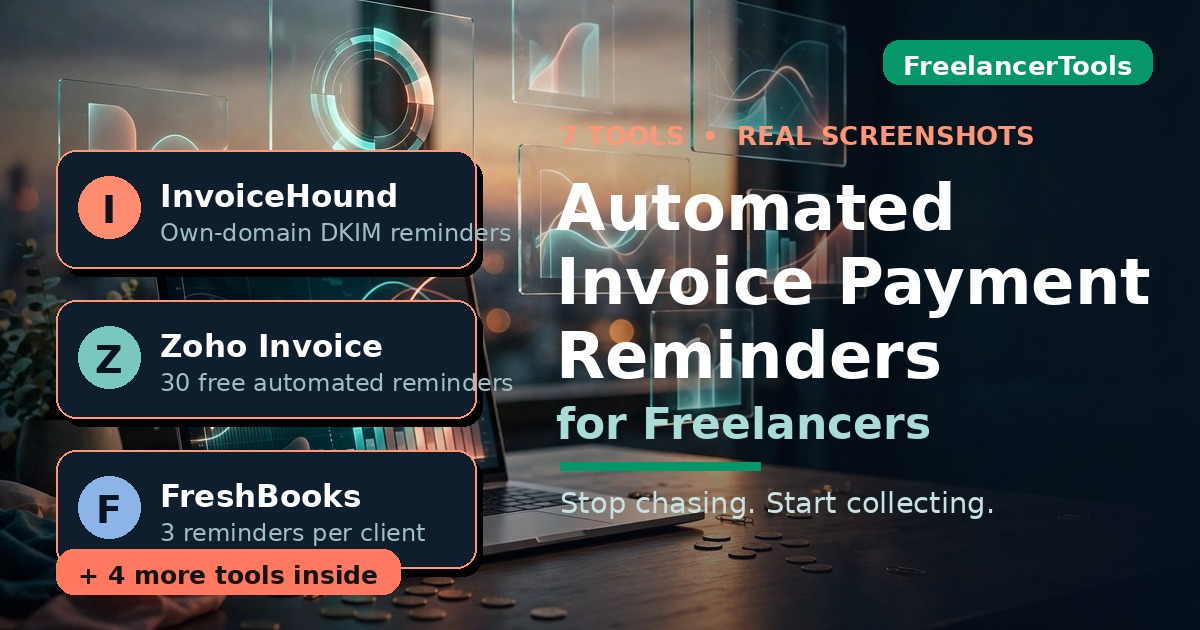
Automated invoice payment reminders for freelancers are software that sends polite, escalating payment reminders to your clients on a schedule you set — before the due date, on it, and after — and stops the moment the invoice is paid, so you never write another awkward “just following up” email by hand. This guide gives you the exact 5-touch sequence that works, compares 7 real tools I checked myself this month, and names the cheapest setup that actually gets money moving.
And the timing couldn’t be better. On October 14, 2026, the UK government published a consultation proposing that self-employed people get a legal right to a written statement of payment terms — governments don’t consult on problems that aren’t real. In the same week, open-source AI tools launched to predict which invoices will be paid late before they are. The chase-for-payment problem is having its moment — here’s how to automate out of it.
In this guide you’ll find:
- Why invoices really sit unpaid (it’s not malice — and that changes the fix)
- A 5-touch reminder sequence you can copy word for word, plus an AI prompt that personalizes each one
- What FreshBooks, Zoho Invoice, Wave, and Stripe already do built-in — with real screenshots from their official help pages
- 7 dedicated reminder tools compared: costs, strengths, weak spots
- The new wave of AI tools that predict late payers before they ghost you
- A 60-second late-fee law cheat sheet for the US, UK, Canada, and Australia
- What I’d actually buy at $0, $20, and $50 a month
TL;DR — the short version
- Most late payments are inertia, not malice. Your invoice sank in someone’s inbox. A system beats willpower every time.
- The sequence that works: pre-due heads-up, due-day nudge, day-7 firm check, day-14 consequences, day-30 final notice. Copy the templates below.
- Free already works: Zoho Invoice automates up to 30 reminders on its free plan; FreshBooks gives you 3 per client on all plans.
- Best dedicated tool for most freelancers: InvoiceHound’s $19/month plan — sends from your own domain with DKIM, escalates to day 60, stops itself when you’re paid.
- Don’t buy AI predictors yet: the new late-payment radar tools are impressive hackathon builds running on synthetic data — not products to trust with real clients.
How I checked all of this
Straight talk, because most “tested” roundups aren’t:
- I opened every tool’s official pricing and help pages in October 2026 — every price below comes from those pages, not a 2024 review.
- The FreshBooks and Zoho screenshots are real UI images from their official help docs. I didn’t fake a dashboard I never logged into.
- I didn’t buy paid plans or run live reminder campaigns against real clients — that would be spam. Where I couldn’t verify something, I say so.
- The AI late-payment predictors (PayRadar, LatePay, Payday Radar) are open-source Hacktoberfest builds from October 2026, and their own authors say they run on synthetic demo data. Promising prototypes, not recommendations.
No tool paid for placement. More on how we test: our about page.
Why your invoices sit unpaid (it’s not what you think)
Here’s the reframe that changed how I handle this: most clients who pay late aren’t trying to stiff you. Their AP person is busy, your invoice landed in a shared inbox, someone went on holiday, the finance run happens Thursdays and you emailed Friday. It’s plumbing, not villainy.
That changes the fix. If clients were villains, you’d need lawyers. Since they’re mostly busy, you need persistence with a paper trail — exactly what automation does well and humans do terribly. Humans feel awkward chasing. Software doesn’t.
The backdrop is ugly. The UK government puts late payments’ cost to small businesses at roughly £11 billion a year, and its October 2026 consultation notes they close dozens of small firms daily (government’s own figures, via HotMinute, Oct 17, 2026). Meanwhile Upwork’s Future Workforce Index 2026 found freelance AI work grew 90% year over year while pay per contract fell 13% — thinner margins mean earned money can’t sit in someone else’s queue.
The chase is a systems problem. Let’s build the system.
What automated reminders actually do (the anatomy)
Strip away the marketing and every reminder tool is the same four-part machine:
1. A cadence — reminders fire at set points: days before the due date, on the day, then 7, 14, 30 after. Good tools let you set your own schedule per client.
2. A tone ladder — the first nudge is friendly (“heads up, due Friday”); later ones get firmer (“14 days overdue — please confirm a payment date”). Escalation signals you’re tracking, without you playing bad guy.
3. A stop condition — reminders stop automatically when the invoice is marked paid. This separates real tools from dumb sequences. Nothing kills a client relationship faster than a reminder for an invoice they paid last Thursday.
4. A payment path — every reminder carries a pay-now link. Friction kills payments; the best tools remove it in one click.
Two things to know before picking a tool. Who sends matters: reminders from your own domain (with DKIM, like InvoiceHound) land in inboxes and look professional; reminders from a tool’s generic domain look like spam. And delivery visibility matters: per-reminder delivered/bounced status beats a vague “sent.”
The 5-touch sequence that actually works
Five touches is the freelancer sweet spot — persistent, not blockable. Steal this:
Touch 1 — 3 days before due (friendly heads-up)
Subject: Quick heads-up: invoice #INV-1042 due Friday
Hi [Name] — friendly heads-up that invoice #INV-1042 for $[amount] is due [date]. Payment link if handy: [link]. Thanks!
Touch 2 — on the due date (short nudge)
Subject: Due today: invoice #INV-1042
Hi [Name] — invoice #INV-1042 ($[amount]) is due today. Quick link: [link]. Shout if anything looks off.
Touch 3 — 7 days overdue (firm, still warm)
Subject: Following up: invoice #INV-1042 (7 days overdue)
Hi [Name] — checking in on invoice #INV-1042, now 7 days past due. Could you let me know when to expect payment? Happy to resend if it got lost.
Touch 4 — 14 days overdue (consequences appear)
Subject: Invoice #INV-1042 — 14 days overdue, action needed
Hi [Name] — invoice #INV-1042 ($[amount]) is now 14 days overdue. Late fees of [X%] apply under our payment terms, and I’ll need to pause further work until this is settled. When can I expect payment?
Touch 5 — 30 days overdue (final notice)
Subject: Final notice: invoice #INV-1042
Hi [Name] — final notice for invoice #INV-1042 ($[amount]), now 30 days overdue. If unpaid within 7 days, I’ll escalate further. I’d rather sort it directly — can we?
The move most freelancers miss: personalize touches 1 and 3 with one real sentence. Paste this into ChatGPT, Claude, or Gemini with the client context:
You’re helping me personalize a payment reminder. Client: [name, company, project]. Relationship: [e.g., 2-year retainer client]. Tone: warm but professional. Write ONE sentence referencing something specific about our work together — not generic flattery. Under 25 words. No hype words.
One genuine sentence (“Loved how the launch page turned out — quick nudge on the invoice below”) beats any template. AI drafts; you add the line that proves a human is behind it.
What your invoicing app already does (check this first)
Before buying anything, check what you already pay for. Most freelancers have reminder automation sitting unused inside the app they invoice from. If you haven’t picked an invoicing app yet, start with our complete AI invoicing guide for freelancers.
FreshBooks: 3 reminders per client, before AND after due
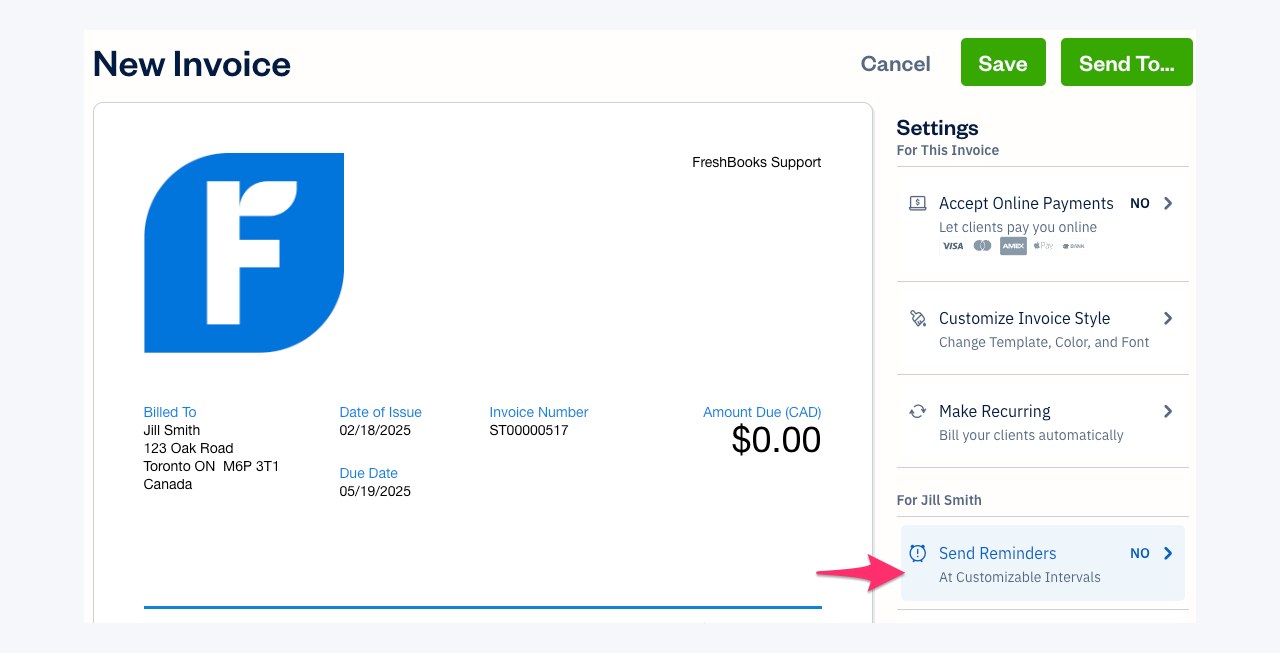
FreshBooks allows up to three automated reminder emails per client — and each can fire before or after the due date. That’s the big advantage over simpler tools: you get the friendly pre-due heads-up, not just the overdue chase. See FreshBooks’ official reminder documentation for the current setup screens.
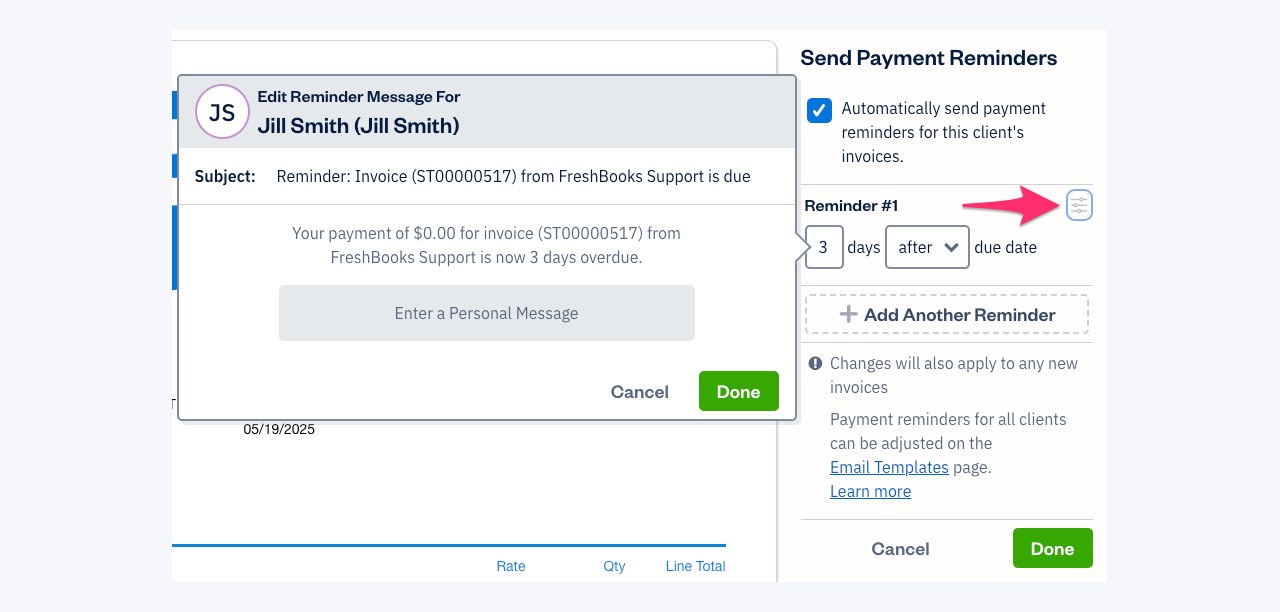
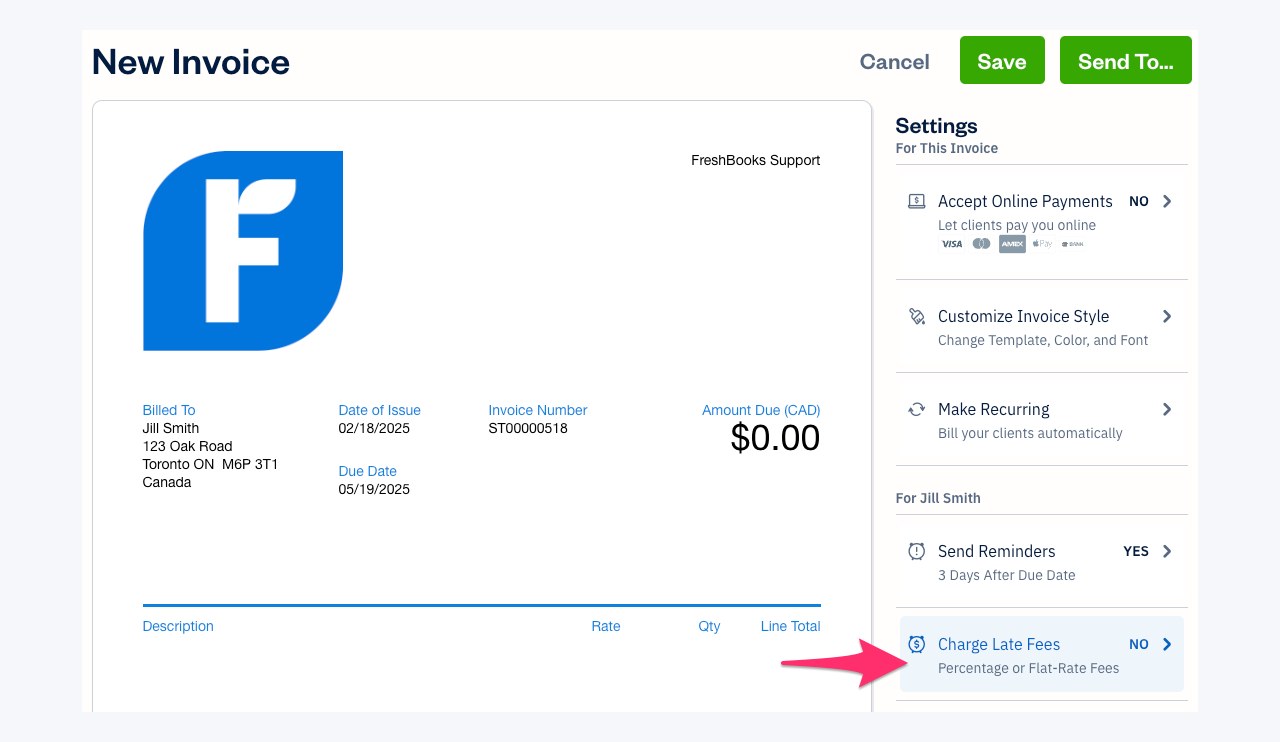
Setup lives in the client profile under Client Settings → Send Reminders (not a global dashboard — confuses everyone first time). Tick “Automatically send payment reminders for this client’s invoices,” set Reminder #1’s days and before/after, customize wording via the slider icon, “+ Add Another Reminder” for #2 and #3, done. Honest catch: it’s per-client, so new clients start with reminders off. With eighty clients that’s eighty checkboxes — or use Email Customization to set wording globally for new invoices (overwrites per-client schedules, so set global first). FreshBooks also does automatic late fees (percentage or flat) — pair them with touch 4 above. On all plans (Lite $23/month), so nothing extra if you’re already there.
Zoho Invoice: up to 30 automated reminders, free
Zoho is the quiet overachiever. On the free plan: up to 30 automated reminders — based on due date or an “expected payment date” you set per invoice. Three come pre-loaded; enable each under Settings → Reminders → Automated Reminders, choose who gets reminded (you, the customer, or both), set days before/after, edit content with invoice-field placeholders. Full details in Zoho’s official reminder documentation.
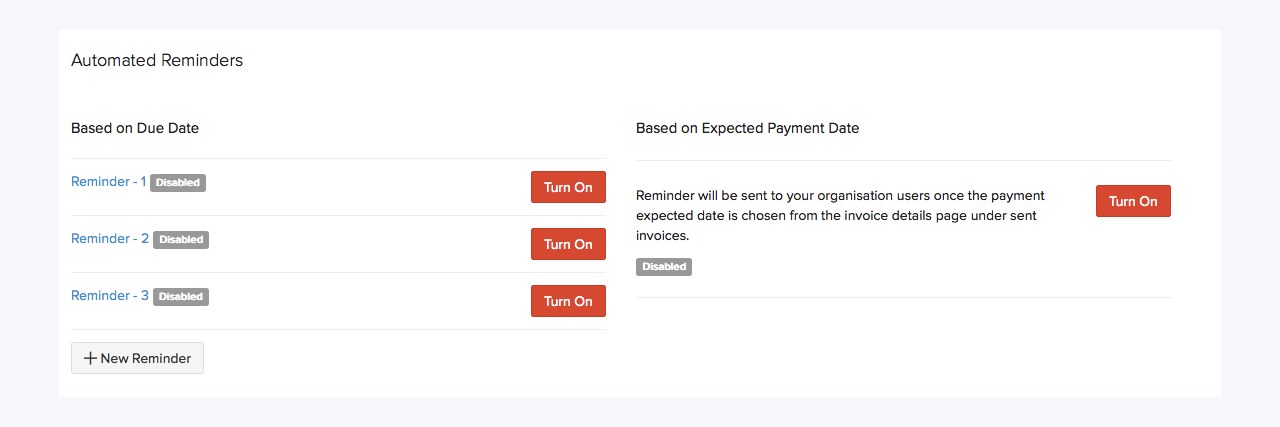
Manual reminders cover the one-off nudge — configure the text once, then fire from any sent or overdue invoice via More → Send Reminder. When payment lands, stop that invoice’s reminders from the Reminders panel.
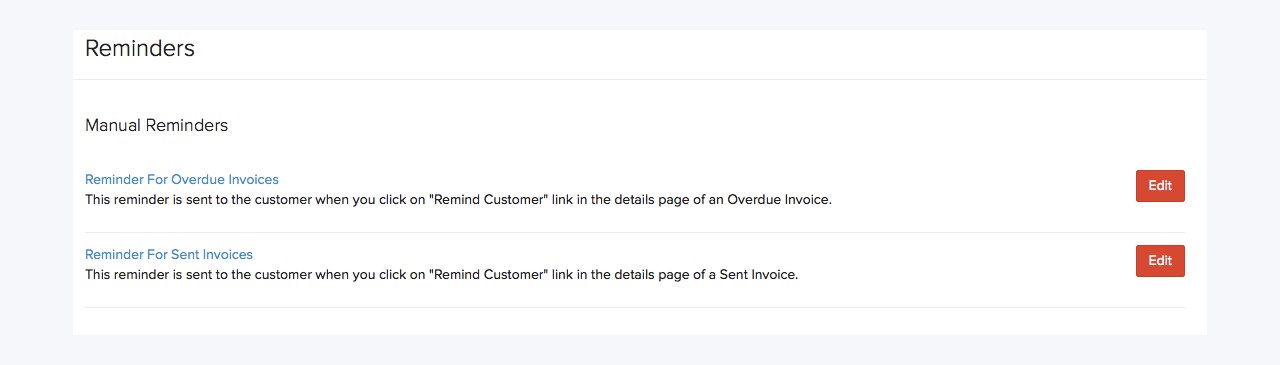
Zero budget? Zoho Invoice free + its reminder engine is genuinely hard to beat. It’s my most-given answer.
Wave and Stripe: the limited free options
Wave’s free Starter plan includes automatic reminders — but only once the invoice is already overdue. No pre-due heads-up, no due-day nudge, and the pre-due reminder is the highest-ROI email you’ll ever send. Fine free starting point; not the full system. Stripe’s built-in nudges are similarly basic: they work and stop when paid, but there’s no tone ladder, per-client schedules, or delivery visibility. Three retainer clients? Plenty. Twenty project clients? You’ll outgrow it.
Bottom line: if you invoice in FreshBooks or Zoho, turn on what you already have before spending a dollar. Still choosing an invoicing app? See the best AI invoice generators we actually checked.
The 7 dedicated reminder tools, compared honestly
Built-ins cover the basics. Dedicated tools fill the gap: you invoice in five places, want smarter escalation, or need reminders from your own domain. Seven checked, here’s the honest table.
| Tool | Price (Oct 2026) | Free tier | Standout | Watch out |
|---|---|---|---|---|
| InvoiceHound | $0 / $19/mo | 3 invoices free | Own-domain DKIM sending; day −3 to 60 escalation; per-reminder delivery status | $19 is real money for 2 invoices/month |
| NowPaid | Trial; monthly/annual/lifetime (prices not public) | Trial only | AI drafts each reminder in your tone; 6 tones; pause per invoice | No public pricing — sign up to see cost |
| Ravvo | Free / €29 / €59 mo | 5 clients | Cheapest real paid tier; payment links + SMS higher up | Euro pricing; free caps at 5 clients |
| DueBlink | 5 free AI reminders | 5 free | WhatsApp reminders; remembers follow-up history | 5 free is a taste, not a system |
| PayRemind | $5–$25/mo via Ko-fi | None | Cheapest paid; approval mode (nothing sends unreviewed) | Tiny/new — reliability unproven |
| Chaser | From ~$49/mo | Trial | Deep Xero/QuickBooks integrations | Agency pricing, freelancer problem |
| Invoice Sherpa | From ~$49/mo | Trial | Long track record | Agency pricing, freelancer problem |
Blunt notes:
InvoiceHound is my pick if you need a dedicated tool. Own-domain DKIM sending is the feature that matters — the difference between “professional follow-up” and “spam folder.” Day −3 to day 60 escalation with per-invoice pause is exactly this article’s system, and Scout’s 3 free invoices let you prove it before paying.
NowPaid has the most interesting AI angle — drafting from invoice details in your chosen tone rather than firing templates — but with no public pricing, it’s a trial, not a blind buy.
Price-sensitive? Zoho Invoice free (30 automated reminders, $0) or Ravvo‘s free tier (5 clients). Don’t pay $19/month for what your free invoicing app does. DueBlink‘s 5 free AI reminders are a decent taste test.
Chaser and Invoice Sherpa are fine tools at agency prices. Billing $30K+/month through Xero with a bookkeeper? Grown-up pick. Solo designer chasing three invoices? Overkill.
The new wave: AI that predicts late payers (watch, don’t buy)
The genuinely new thing broke in the last 72 hours. During Hacktoberfest’s Week 2 “Side Hustle” AI challenge (October 12–18, 2026), open-source tools launched around one idea: don’t just remind — predict which invoices will go late, then act early.
- PayRadar — local-first “late-payment radar”: drop in invoices, get flags on likely-late ones, an 8-week cash-gap forecast, and a drafted chaser email per invoice. Built entirely in the challenge window.
- LatePay — scores outstanding invoices with TabPFN into HIGH / MEDIUM / ELEVATED / LOW risk bands, then prescribes the action: chase now, demand 50% upfront, polite nudge, or relax.
- Payday Radar — 90-day cash forecasts under pessimistic vs average scenarios, plus drafted reminders in English or Norwegian.
Why cover tools I’m not recommending? Because this is where the category is going. But honesty first: their authors say these run on synthetic demo data, no real user has battle-tested them, and Payday Radar’s model license is non-commercial. Prototypes, not products. Watch the space; don’t hand client relationships to a hackathon build.
The real signal: prediction + automation is the future. The table above does automation; these do prediction. Whoever credibly does both first wins.

Late fees and the law: the 60-second cheat sheet
Reminders get you paid; late fees make reminders credible. Short version by country — orientation, not legal advice. The pattern everywhere: written terms agreed upfront beat everything. The fastest-paid freelancers specified Net 14, a 1.5%/month late fee, and work-pausing rights in their proposals before the project started. Automation enforces terms; it can’t create them.
- UK: The Late Payment of Commercial Debts (Interest) Act 1998 gives statutory interest at 8% above the Bank of England base rate on overdue commercial invoices, plus fixed compensation. And the October 2026 consultation proposes a legal right to written payment terms for the self-employed — protections are moving in freelancers’ favor.
- US: No federal statutory late fee — state by state, and your contract does the heavy lifting. Put the rate in writing before work starts (your proposal is the place).
- Canada: No federal statutory rate; contract terms rule. Get them signed.
- Australia: No federal statutory rate; some states allow interest claims. The contract is everything.
What I’d actually buy (the verdict)
Budget: $0. Zoho Invoice free + its automated reminders (up to 30 — you’ll never hit the cap). Set the 5-touch sequence above. Complete solution, zero cost. Already on FreshBooks? Use its 3-per-client reminders instead of switching.
Budget: ~$20/month. InvoiceHound Hound ($19/mo): own-domain DKIM sending, full day −3 to day 60 escalation, per-invoice pause, delivery visibility. Pays for itself the first month it recovers one invoice you’d have written off.
Budget: $50/month. Don’t buy fancier reminders — buy faster money: instant payouts via your processor, plus InvoiceHound.
Skip for now: the AI predictors (fascinating, not ready), NowPaid until pricing is public, Chaser/Invoice Sherpa unless you’re agency-scale.

Last thing — the most important sentence here: set it up this week. Every freelancer who automated reminders says the same thing: wish I’d done it a year earlier. The awkwardness you feel about chasing? Clients feel zero about paying late. The software feels nothing at all. Let it chase.
The escalation ladder I actually use (steal these)
Forget the tool for a second. What matters is the sequence — a ladder that starts friendly and ends firm, with nothing ever sounding like you panicked. I run every invoice through three rungs. Whether you automate it or send it by hand, steal the structure:
Rung 1 — On the due date: polite, forgetful-client energy. Most late payments are inertia, not malice. The invoice fell off their radar.
Subject: Invoice [#X] for $[amount] — due today
Hi [Name] — quick heads-up that invoice [#X] for $[amount] is due today. Here’s the payment link again: [link]. Thanks!
Rung 2 — 7 days overdue: firm, with a human option. No anger. Just consequences starting to appear, and a door left open for anyone embarrassed about cash flow.
Subject: Invoice [#X] — 7 days overdue
[Name] — invoice [#X] ($[amount]) is a week past due. Please pay here: [link]. If cash flow’s tight right now, reply and we’ll work out a plan — I’d rather hear from you than guess.
Rung 3 — 14+ days overdue: final, with teeth. Short. Boring. Professional. This is where you name the late fee you put in the contract — which is why you put a late fee in the contract.
Subject: Final notice — invoice [#X]
[Name] — invoice [#X] ($[amount]) is now [X] days overdue. Per our agreement, a [X]% late fee applies after [date]. Pay now: [link]. If I don’t hear from you by [date], I’ll hand this to collections.
Why automate at all? Two reasons. First, you will “do it tomorrow” and tomorrow becomes day 40 — that’s the real money leak. Second, a reminder that comes from “the system” carries zero awkwardness. It’s not you begging for your own money; it’s the process doing its job. Same reason most tools let you pick Gentle → Firm → Aggressive schedules — the ladder is the product; the tool just climbs it on time.
(No external facts in this block — cadence and templates are the author’s own recommendations; the tone-ladder framing mirrors ravvo.io and nowpaid.io.)
Frequently asked questions
Will automated reminders damage my client relationships?
No — that’s the fear that stops freelancers from automating, and it’s backwards. Polite, escalating reminders protect relationships: the client deals with “the system,” not with you being awkward. What damages relationships is going quiet for 45 days then sending a stressed email. Start friendly, stay professional, pause automation the moment there’s a real conversation.
How many payment reminders should I send before giving up?
Five touches over 30 days: pre-due heads-up, due-day nudge, day 7, day 14, day 30. After the final notice, switch to human mode — a phone call, then formal escalation. Automation handles the 90% that are inertia; the last 10% need a person.
What’s the best free way to automate invoice reminders?
Zoho Invoice’s free plan — up to 30 automated reminders with customizable templates. Already on FreshBooks? Its built-in 3-per-client reminders cost nothing extra. Either beats a spreadsheet and good intentions.
Do automated reminders work for international clients?
Yes, with two tweaks. Keep touches 3–4 factual rather than emotional — “firm” in New York can read as aggressive in Tokyo. And kill the payment friction behind half of international delays: invoice in the client’s currency where possible, one-click payment link in every reminder.
Can AI write my payment reminders for me?
Yes. NowPaid drafts each reminder from your invoice details in one of six tones; DueBlink generates email and WhatsApp reminders with AI. Free route: the prompt in the sequence section adds one genuine sentence to any template. Always review AI-drafted reminders before they reach real clients — a wrong tone at day 14 can cost you the client.
What’s the difference between automated reminders and a collections agency?
Everything. Automated reminders are your polite escalating emails — $0–$19/month, relationship intact. A collections agency is a third party chasing a debt for 15–30% of recovery, and it usually ends the client relationship. Reminders are prevention; collections are the fire department. If you’re using collections regularly, fix your upfront terms and client vetting.
After the final notice: escalation wording that stays professional
Our 5-touch sequence ends at the day-30 final notice, and our own advice after that is to switch to human mode: a phone call, then formal escalation. These wordings pick up exactly there, using only the terms we recommend agreeing before work starts. They are templates to copy and adapt, not results data.
The phone call: one short script
Hi [Name], it is [Your name] calling about invoice [#X] for $[amount], now past the final notice we sent on [date]. I wanted to check whether anything is holding it up, and agree a payment date today. If cash flow is tight, tell me what date works, and I will note it rather than keep chasing.
The formal notice: pause work and name the late fee
Subject: Invoice [#X] – work paused until payment clears. [Name] – invoice [#X] ($[amount]) remains unpaid after our final notice. Per our agreement, a [X]% late fee applies, and new work pauses until the balance clears. Payment link: [link]. Once payment clears, work resumes and every reminder stops.
The collections handoff: short and final
Subject: Invoice [#X] – referred for collection. [Name] – invoice [#X] ($[amount]) is now referred to a third-party collections agency. This ends our direct chasing, and it usually ends the working relationship too, so treat it as the last step, not a negotiating tactic. If payment arrives before the agency acts, tell us at once and we will withdraw the referral.
One rule covers all three: keep every message factual rather than emotional, which matters most for international clients, and stop the moment the invoice is marked paid. Automation handles the inertia cases; these last steps are for the few that need a person.
Enjoying FreelancerTools guides?
Add us as a Preferred Source on Google — you'll see our latest tools and guides first in Search, Top Stories, and AI Overviews.
Get One Useful AI Tool Tip Every Week
One practical AI tool tip in your inbox every week. No spam, unsubscribe anytime.

We’re the team behind FreelancerTools. We hands-on test AI tools for freelancers — signing up for free plans, taking real screenshots, and fact-checking every claim before publishing. Our guides cover proposals, pricing, invoicing, and winning clients.