
How to Write Freelance Proposals with AI: The Ultimate Guide (2026)

To write a freelance proposal with AI, give the tool the client’s brief, your rates, and a past result to reference. It drafts the structure; you rewrite it in your voice before sending. Let the model do the research and the layout — the judgment calls, the pricing, and the personal details that win the job stay with you. This guide shows you how to write freelance proposals with AI, from blank page to sent proposal.
- Think of AI as your drafter, not your closer. Unedited output reads like everyone else’s — and clients notice.
- The sequence that works: research → prompt → draft → price → humanize → send → follow up. Each step is covered below.
- We opened the tools ourselves: ran Typli.ai’s free generator (no signup, real draft in seconds) and screenshotted October 2026 pricing on Bonsai, PandaDoc, HoneyBook, Better Proposals, and Proposify.
- Inside: the 7-step workflow, 10 ready-to-paste prompts, the pricing framework, the tool comparison, and a 10-question FAQ.
In this guide you’ll find: the 7 sections every winning proposal needs, the 7-step AI workflow, 10 copy-paste prompts, screenshots from a free proposal generator we tested live, an October-2026-verified comparison of 5 proposal tools, a pricing framework, the proposal-to-contract handoff, 5 AI mistakes to avoid, and a 10-question FAQ.
As of October 9, free Gemini only offers the Flash-Lite model — the model picker is gone and most prompts auto-route to the cheapest model. Digital Trends reports the rollout is now live, and SelfEmployed notes it hits “freelancers and solo owners who lean on a free AI assistant to draft proposals.”
What this means for you: if your proposals run on free Gemini, expect thinner first drafts — shorter, blander, less specific. Budget an extra editing pass, consider the $4.99/mo Google AI Plus tier if you write daily, or use a free proposal-specific tool (Typli’s generator below needs no signup).
Press releases don’t make it into our reviews. For this guide we: (1) opened the Bonsai, PandaDoc, HoneyBook, Better Proposals, and Proposify pricing pages live on Oct 11, 2026 and captured every one; (2) ran Typli.ai’s free generator on a realistic $1,500 brief with no signup and read the whole output; (3) re-checked today’s top Google results for this keyword to fill what they skip. Unverifiable claims stayed out. We’re the FreelancerTools Team — tools get tested against real client work here.
What a Winning Proposal Actually Contains (Read This Before Touching AI)
Here’s the uncomfortable truth: the tool doesn’t win you the client — the structure does. Here’s what winning proposals always contain:
| Section | What it does | Where AI helps most |
|---|---|---|
| 1. The hook | First 2–3 lines that prove you read the brief | Drafting options, but YOU pick the angle |
| 2. Understanding of the problem | Restate their goal in your own words | Summarizing a long brief into 3 lines |
| 3. Your approach | How you’ll do the work, step by step | Turning a rough plan into a clean sequence |
| 4. Relevant proof | One or two results that match their project | Zero — this is 100% you |
| 5. Scope & deliverables | Exactly what’s included (and what isn’t) | Expanding your bullet notes into clear scope |
| 6. Timeline | Realistic dates with a buffer | Sanity-checking your timeline math |
| 7. Pricing & next step | Clear price, payment terms, one call to action | Formatting pricing tables, drafting terms |
Every section answers one silent question: “Does this person get my problem, and can they fix it without drama?”
And section 4 — proof — is the one AI can never write for you. “I redesigned a bakery site last spring and their online orders went up 40% in two months” is a sentence no model can invent honestly. Don’t let it try. Clients check.
The 7-Step AI Proposal Workflow (Blank Page to Sent)
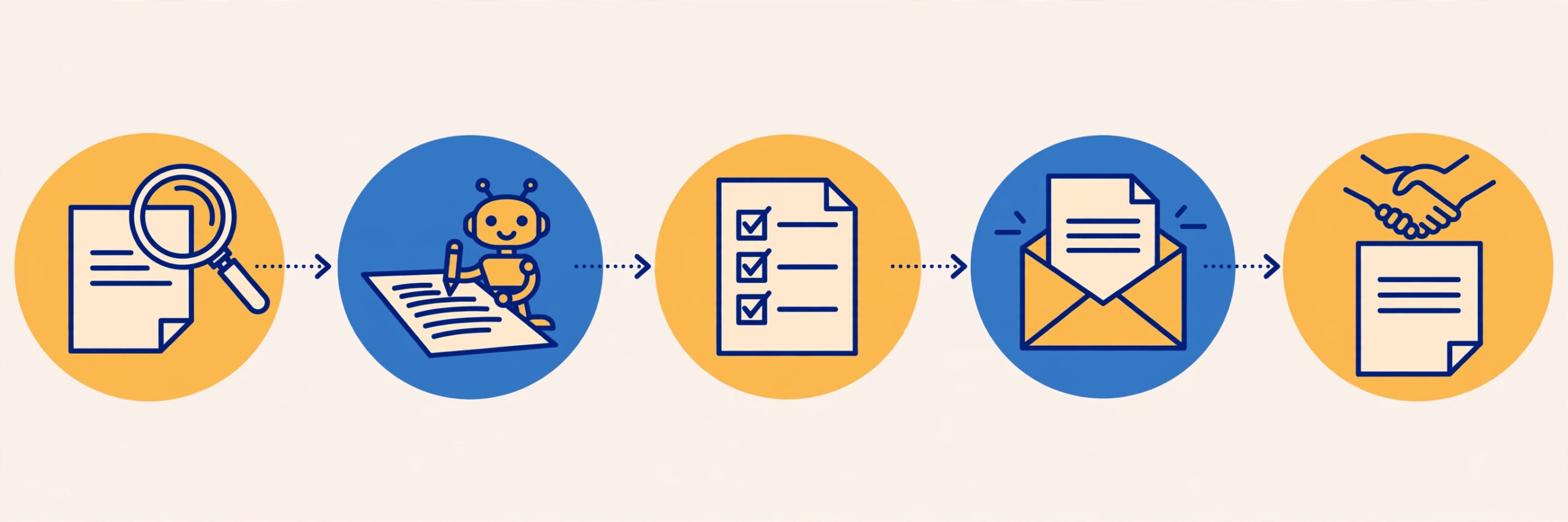
The sequence below is the one every prompt in the library plugs into. If you’re learning how to write freelance proposals with AI, follow the sequence in order — skip steps and the proposal gets weaker.
Step 1: Research the client (10 minutes, no AI yet)
No AI first. Open the client’s website and whatever brief they sent. Note what they sell, who their customers are, and what “done” looks like. AI is brilliant at writing and terrible at caring — the caring part is yours, and it’s what your hook is built from.
Step 2: Brief the AI like a colleague (5 minutes)
Don’t paste “write me a proposal” — that’s how you get generic mush. Give it the client, the project, your constraints, and your voice (Prompt #1 below). Think of it as briefing a smart junior colleague who’s never met the client.
Step 3: Generate the structured draft
Expect 70% right: good bones, bland flesh. If it looks 95% perfect, you briefed it too vaguely — be suspicious of easy drafts.
Step 4: Price it yourself (AI assists, you decide)
Never let AI set your price. It doesn’t know your rent, your taxes, or that this client will need three extra calls. Get your number from the pricing framework below, then have AI format it into a clean table. The number is yours; the table is AI’s.
Step 5: De-AI the whole thing (15 minutes — the most important step)
Read it out loud. Any sentence you’d never say to a friend gets rewritten. Add one detail per section that only you could know — something from their website, a question about their timeline, a relevant result. This turns “AI proposal” into “proposal written by a human who used AI.”
Step 6: Format and proof
Short paragraphs. Bold the key numbers — price, timeline, deliverable count. One call to action: a 15-minute call. Spellcheck it; AI hallucinates names and numbers more often than typos.
Step 7: Send, then follow up
The proposal is the middle of the workflow, not the end. Day-3 nudge, day-7 value-add, day-14 breakup email. There’s a prompt for each in the library below.
The Copy-Paste Prompt Library (10 Prompts, Ready to Use)
These work in ChatGPT, Claude, or Gemini — replace everything in [brackets]. One caveat: since the October downgrade thinned out free Gemini’s drafts, run the heavy drafting prompts (#2 and #6) on a paid tier or a proposal-specific tool.
Prompt 1: The brief (use first, every time)
“I’m a freelance [role] with [X] years of experience. Potential client [name/type] wants [project in one sentence]; their goal is [goal]. My relevant past result: [one specific result with a number]. My rate range: [$X–$Y]. Keep this context and ask me for anything missing before drafting.”
Prompt 2: The full draft
“Using the context above, draft a freelance proposal: (1) 2-sentence hook referencing something specific about the client’s business, (2) their problem in 3 lines, (3) step-by-step approach, (4) a placeholder marked [ADD YOUR RESULT], (5) scope bullets, (6) realistic timeline with buffer, (7) pricing table with payment terms. Confident, plain-spoken, no jargon. Under 600 words.”
Prompt 3: The Upwork bid version
“Condense the proposal above into an Upwork bid under 200 words. Open with the client’s specific need — not my bio. Close with one easy-to-answer question. Skip greetings like ‘Dear Hiring Manager’ and skip the life story.”
Prompt 4: The pricing section
“Format this pricing info as a tidy proposal table: [your breakdown, e.g. ‘Design $900, development $400, revisions buffer $200 — total $1,500, 50% deposit to start, balance on delivery’]. Include one line stating what’s NOT covered. Make it skimmable.”
Prompt 5: The revision pass
“Here’s my draft: [paste]. Tighten it: cut every sentence that doesn’t help the client say yes, replace vague claims with placeholders I must fill in, and flag anything that reads as generic AI writing.”
Prompt 6: The scope-of-work expander
“Expand these scope notes into clear deliverables with explicit exclusions: [your bullets]. Add a ‘not included’ section and how extra revisions are billed. Be thorough — this protects me from scope creep.”
Prompt 7: The objection pre-empt
“The client may balk at [$X] because [likely reason]. Write 3 sentences that reposition the price in terms of [their likely return or what the problem costs them]. Don’t offer discounts.”
Prompt 8: The day-3 follow-up
“Write a 4-line follow-up for a proposal I sent 3 days ago to [client]. Mention [one specific detail from their project]. Warm but not desperate; finish with one question.”
Prompt 9: The day-14 breakup
“Draft a short ‘closing the loop’ email for a proposal quiet for 14 days. Professional, door left open, no guilt-tripping.”
Prompt 10: The de-AI check
“Review my draft: [paste]. Point out word choices, sentence patterns, or formatting habits that scream AI, and give a more natural replacement for each. Don’t sugarcoat it.”
Slightly ironic to ask AI to spot AI writing — but models are decent at pattern-matching their own tics (“leverage,” triple-parallel lists). The final judge is still your ear. Read it out loud.
We Tested a Free AI Proposal Generator (No Signup) — Here’s What Actually Happened
Plenty of guides claim free AI proposal generators exist. We wanted to know if one actually works without making you create an account — because “free” too often means “free after you hand over your email.”
We opened Typli.ai’s AI Proposal Generator (“Free. No signup needed to draft.”) and entered a realistic brief: “Freelance web designer, $1,500 project: redesign a 5-page website for a local bakery, 3-week timeline, 2 revision rounds” — client “The Rolling Pin Bakery.” No account, no email, no paywall. Full proposal in seconds:
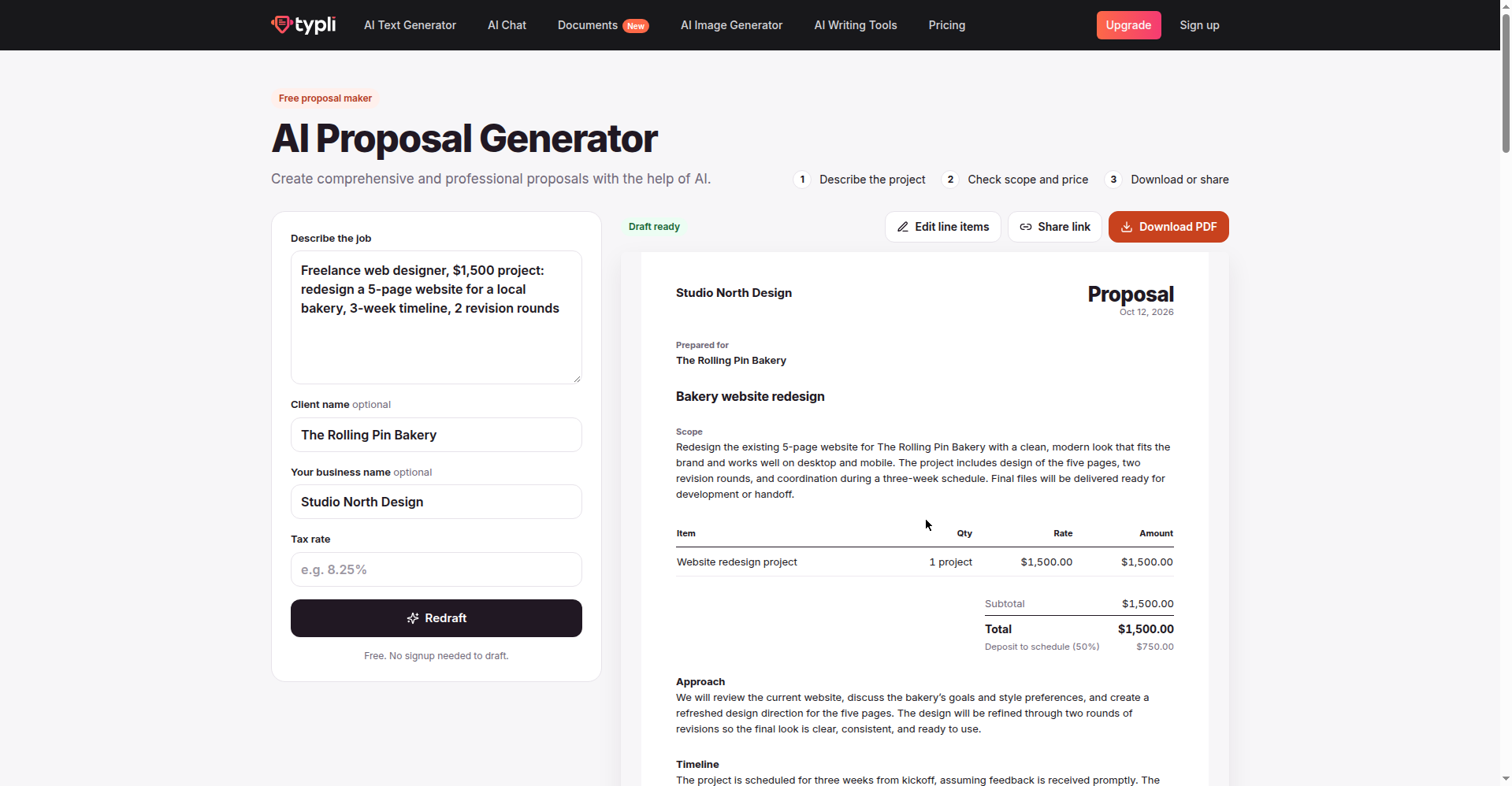
Our honest verdict: good bones. It picked up the $1,500 price, 5-page scope, bakery name, 3-week timeline, and 2 revision rounds — structured into scope, a line-item table, approach, timeline, and terms. A genuine time-saver for the boring formatting half of proposal writing.
The catch: it invented a 50% deposit requirement ($750) we never asked for. Sensible default — many freelancers do ask 50% upfront — but it’s your business decision, not the tool’s. This is exactly why Step 5 (de-AI the draft) exists: free generators make confident assumptions, and confident assumptions about your money need your sign-off.
Two more no-signup options: Qwilr’s AI Proposal Creator is free with no account — you enter your website URL and it builds a 6-page interactive proposal from it. AIFreeBox’s AI Proposal Generator states “No Sign-Up Required. Full Access.” The Typli test above is the one we verified end to end.
AI Proposal Software Compared (Prices Verified October 2026)
Free generators are great for drafting. But when a client says yes, you need software that sends a beautiful proposal, tracks opens, collects the e-signature, and takes the deposit. We opened all five pricing pages live in October 2026 and screenshotted each. Prices are monthly, per user unless noted, as displayed:
| Tool | Starts at | Free option | Proposals included from | AI features | Best for |
|---|---|---|---|---|---|
| Bonsai | $15/mo ($9 annual) | 7-day full trial | Essentials $25/mo | Built-in across plans | Freelancers wanting proposals + contracts + invoicing in one place |
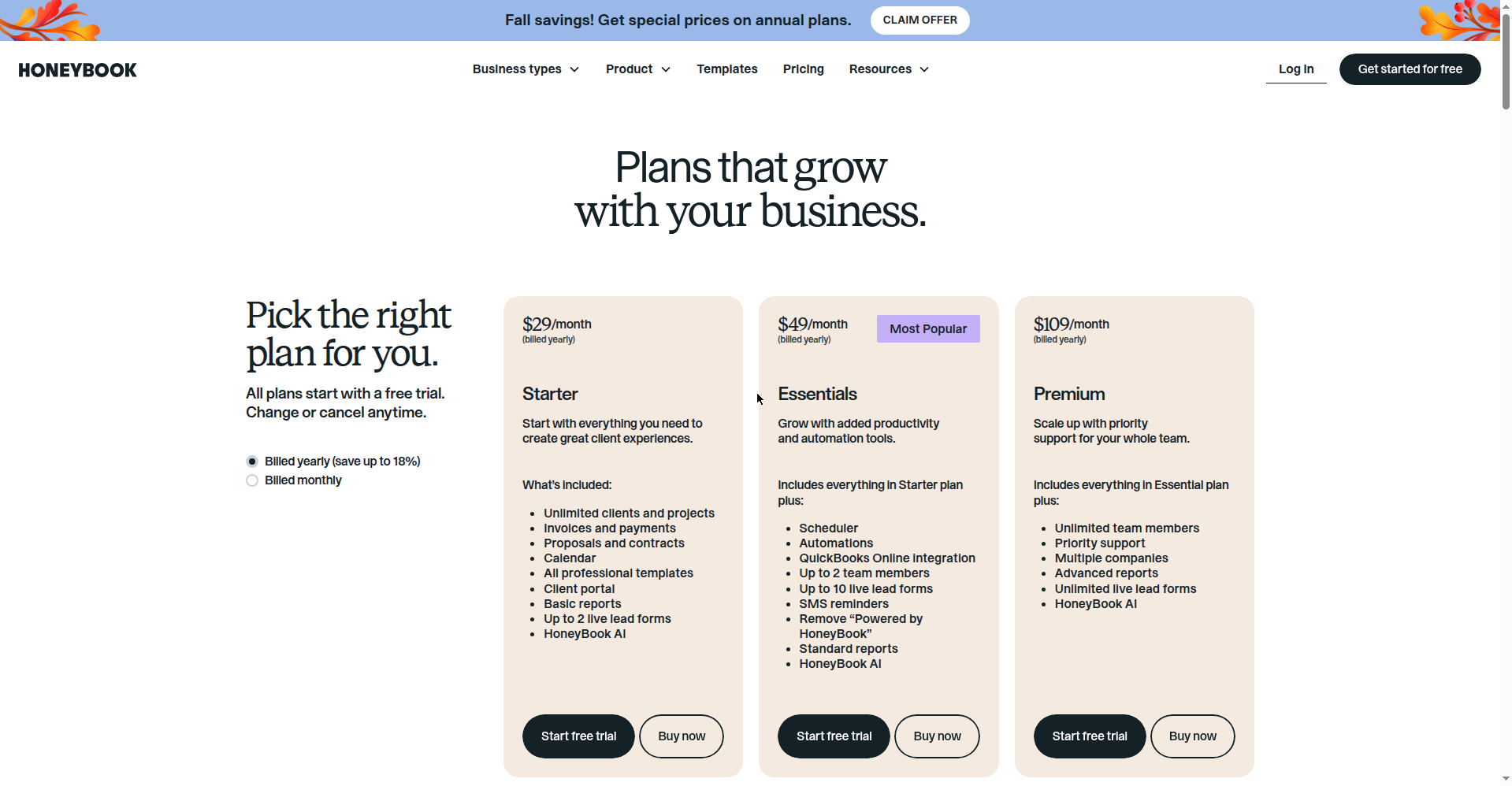
| HoneyBook | $29/mo (annual billing) | Free trial on all plans | Starter $29/mo | Quick-write drafting | Budget pick for beautiful proposals with e-signatures |
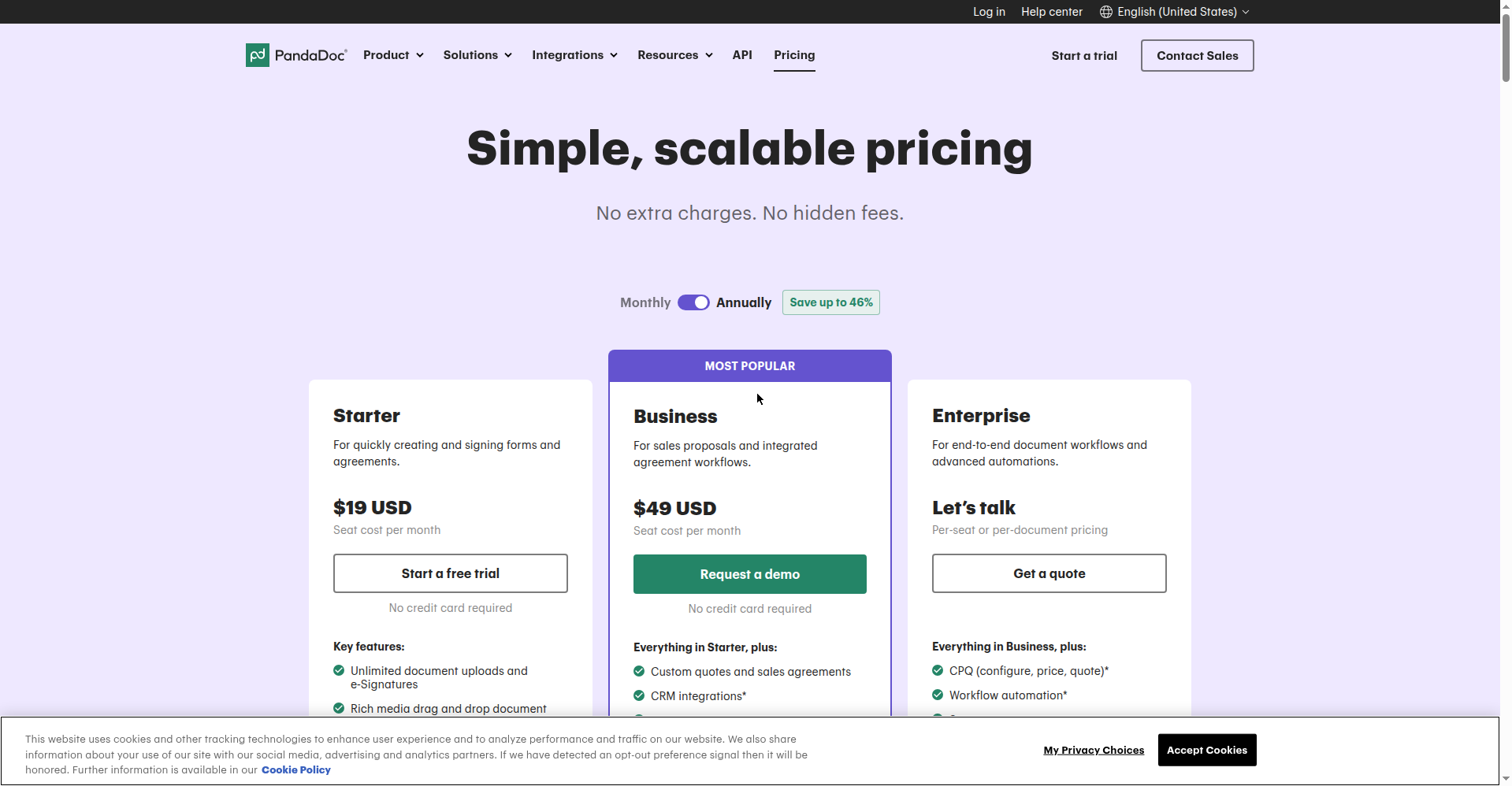
| PandaDoc | $0 free plan (5 docs/mo) | Free plan + trial, no card | Free plan (limited) | AI assistants via MCP (ChatGPT, Claude) | Trying before buying; scales to sales teams later |
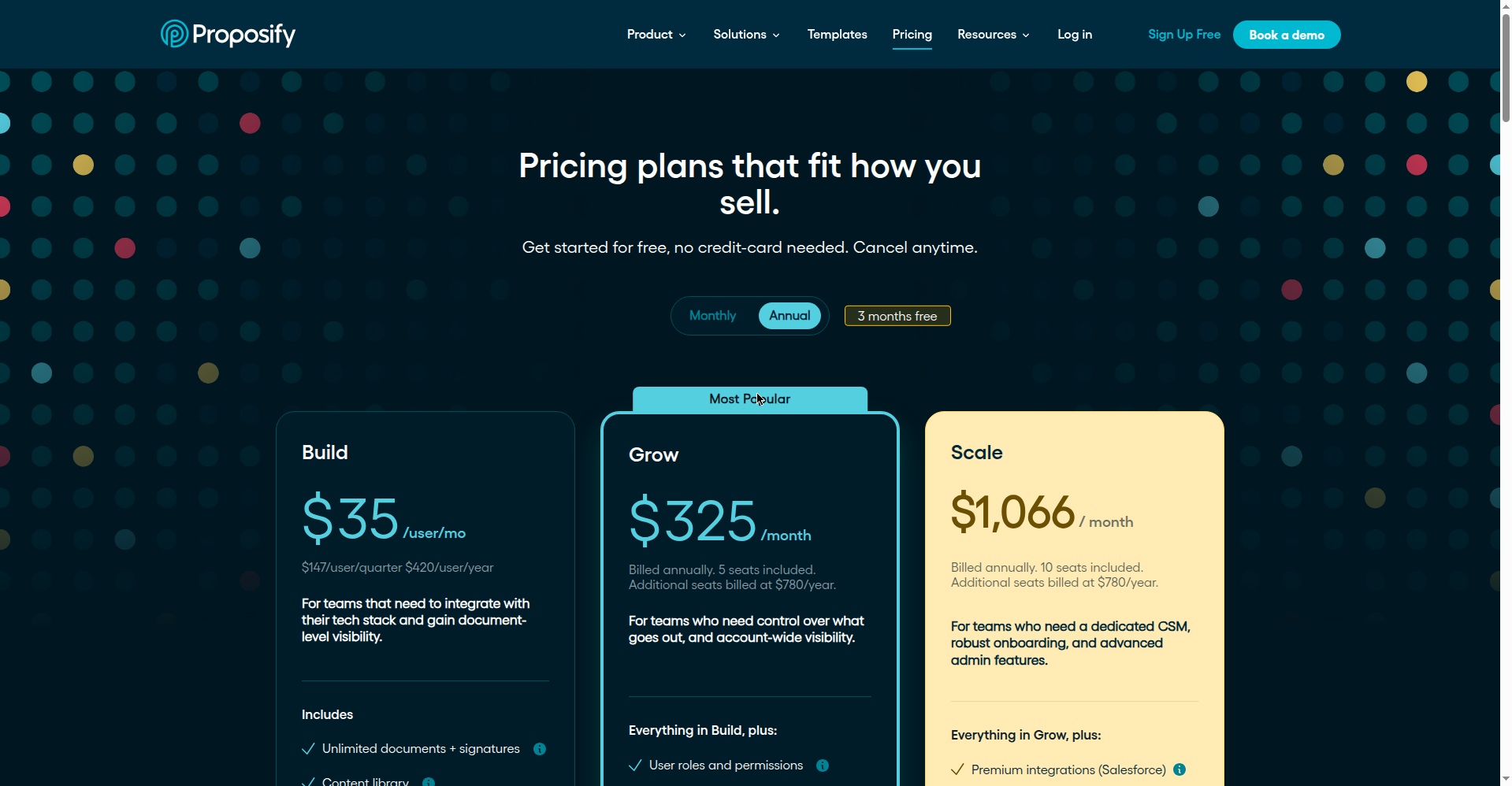
| Proposify | $35/user/mo annual | 14-day full trial, no card | Build $35/user/mo | AI writing widget + Claude MCP server | Teams; overkill for most solo freelancers |
Our take for solo freelancers: start free — PandaDoc’s $0 plan (5 docs/month) or a no-signup generator covers your first proposals. Sending weekly? Better Proposals at $13/mo (annual) is the cheapest way to look like a studio. Bonsai’s $25/mo Essentials only makes sense once you also want its contracts and invoicing. Proposify is built for teams.
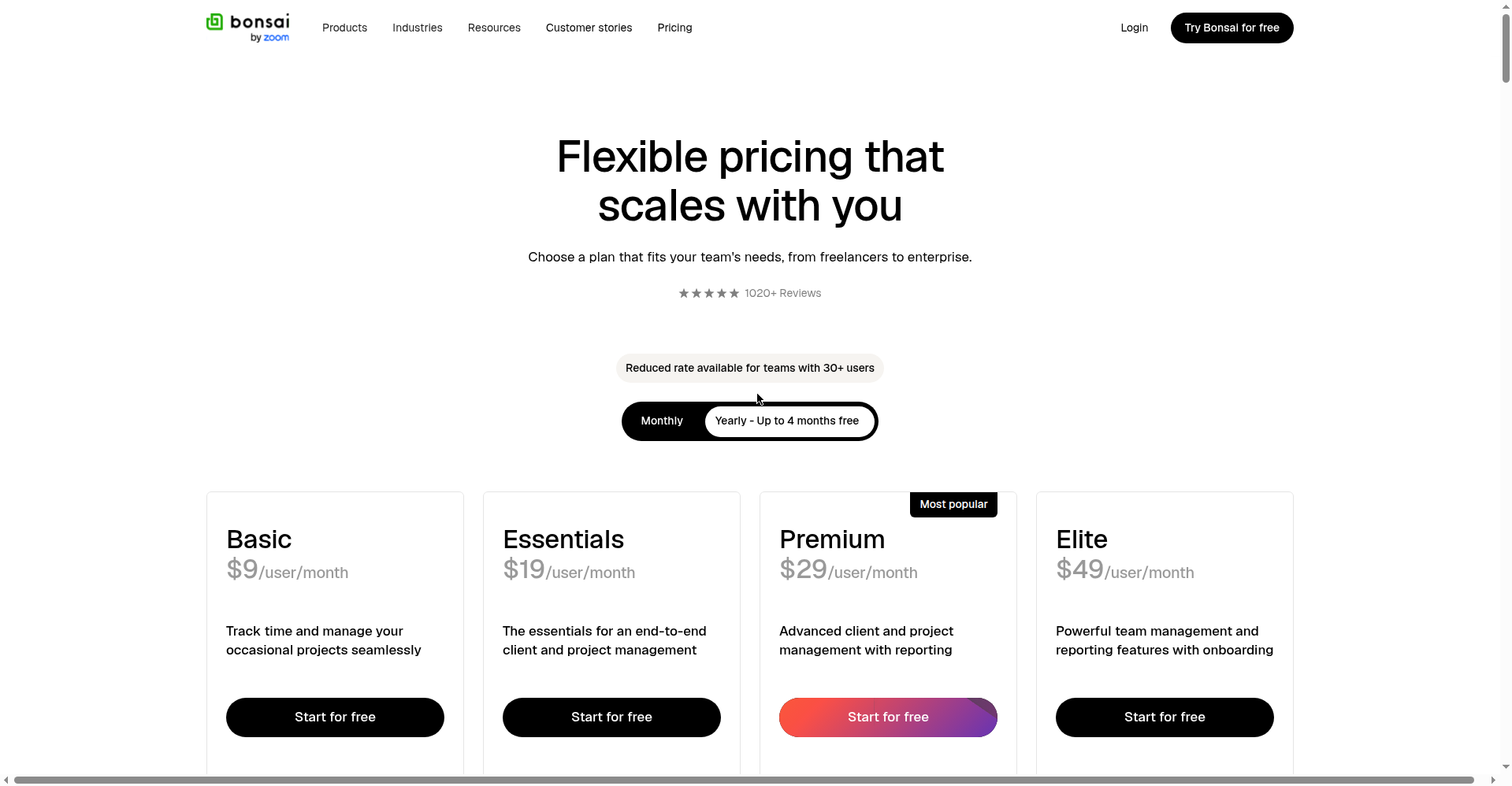
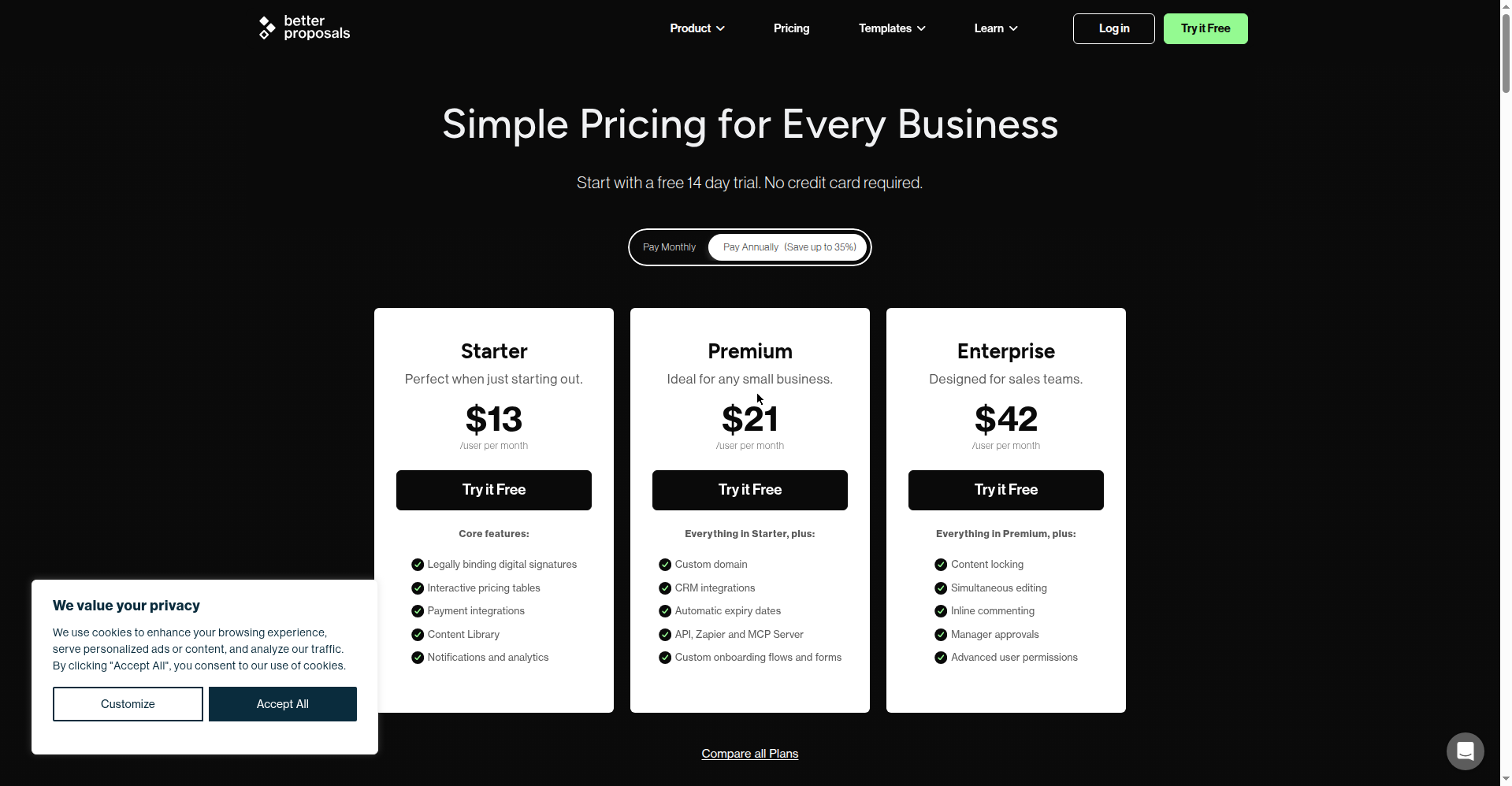
Full-page screenshots of HoneyBook, PandaDoc, and Proposify pricing from our October 2026 check:
The Pricing Section: Stop Guessing, Start Framing
The pricing paragraph is where most freelancers learning how to write freelance proposals with AI get stuck. Four rules:
1. Anchor on the problem, not your hours. One sentence before the number should remind the client what the project is worth to them. “A redesigned site that converts your existing traffic” justifies $1,500; “15 hours of my time” invites hourly math and negotiation.
2. Show the math, briefly. A 3-line breakdown (design / build / buffer) beats a single scary number. Clients don’t argue with arithmetic; they argue with vibes.
3. Name what’s not included. “Includes two revision rounds; further rounds billed at $X.” That single line prevents more freelancer heartbreak than anything else in the proposal. Generators will happily write scope without exclusions — add them yourself, every time.
4. State payment terms like it’s normal. “50% to schedule, 50% on delivery” is standard. Apologizing for your deposit invites late payment. Stating your terms as a matter of course gets you paid on schedule.
If pricing still feels like guesswork, that’s a rates problem, not a proposals problem. Not sure what number belongs in the pricing section? Here’s how much to charge as a freelancer in 2026 — our AI-assisted rate-setting method with the exact formula, live calculator tests, and 2026 benchmarks by niche.
Don’t Stop at “Yes”: The Proposal-to-Contract Handoff
The client says yes. Now what? If your answer is “start working,” you’re exposed. A proposal is not a contract — no kill fee, no IP transfer, no late-payment terms. The 5-minute handoff:
- Send the contract before you start — Bonsai, HoneyBook, and PandaDoc generate one from your proposal in a couple of clicks.
- Collect the deposit with the signature — paid deposit = real project; verbal yes = maybe project.
- Turn the scope section into a scope of work — copy your proposal’s deliverables into the contract verbatim, exclusions included.
The proposal wins the work; the contract keeps the money.
The 5 AI Proposal Mistakes That Lose You Clients
1. Shipping the first draft. Untouched AI copy has a texture — neat triplets, “furthermore,” sentences that sound lovely and say nothing. Clients in 2026 recognize it instantly and mentally file it under “low effort.” The 15-minute humanizing pass is mandatory.
2. Letting AI invent your proof. “I’ve helped dozens of bakeries increase revenue” — no, you haven’t, and the one client who asks for the case study ends the relationship. Placeholder it, fill it with truth.
3. The generic hook. “I’m excited about your project” could open any proposal ever sent. Your hook needs one fact about this client from your step-1 research. AI can’t browse their About page with genuine curiosity — you can.
4. Pricing without terms. A number with no deposit, no payment timeline, and no revision policy invites scope creep. See the pricing framework above.
5. No follow-up sequence. Half of freelance proposals die in the inbox from silence, not rejection. The day-3, day-7, day-14 sequence exists because “just checking in” is where deals quietly expire.
FAQ: How to Write Freelance Proposals with AI
Is it OK to use AI to write freelance proposals?
Yes — drafting, structuring, and polishing with AI is standard in 2026. What’s not OK is sending output unedited or letting it invent experience you don’t have. Judgment, pricing, and proof are yours; AI is the assistant.
Will clients know I used AI?
Only if you send it raw. Unedited AI writing has tells — balanced triplets, generic enthusiasm, zero specifics. The de-AI pass (read aloud, add one detail per section only you could know) removes them. Clients care about relevance, not which tool helped.
What is the best free AI proposal tool?
For drafting with no signup, Typli.ai’s free generator works — we ran it with a real brief and got a usable draft in seconds. For sending and tracking, PandaDoc’s free plan (5 documents/month) is the best $0 option we verified in October 2026.
How long should a freelance proposal be?
Direct clients: under 600 words — clients skim. Upwork bids: under 200 words, first line about their need. Fiverr: around 150 words. Longer doesn’t win more; clearer does.
Should I use AI for Upwork proposals?
Yes — keep it short and lead with the client’s need. Winners reference something specific from the job post in the first two lines. AI drafts the structure; you supply the reference.
How do I price a proposal with AI’s help?
Let AI format the pricing table and draft the terms — but set the number yourself from your rate floor (costs + taxes + buffer). AI doesn’t know your expenses.
Can AI write my freelance contract too?
AI generators can draft one, and Bonsai, HoneyBook, and PandaDoc generate contracts from your proposal — but get human review on legal-weight clauses (kill fees, IP transfer, late payment). We’ll test AI contract generators head-to-head in a future guide.
What’s the biggest mistake freelancers make with AI proposals?
Sending the first draft. Generic output, invented details, no pricing terms, no follow-up. The 7-step workflow above exists so the draft is the middle of the process, not the end.
Do I still need proposal software if I use ChatGPT?
For drafting, no. For sending, eventually yes: software adds open tracking, e-signatures, and payment collection. Start free with PandaDoc’s free tier; upgrade when you’re sending weekly.
How do I follow up without being annoying?
Three touches: day 3 (short nudge referencing their project), day 7 (add value — an idea or article), day 14 (polite breakup, door open). Prompts 8 and 9 draft all three. Silence usually means “busy,” not “no.”
Add FreelancerTools as a Preferred Source in Google Search — open any of our articles in Google, tap the star/source icon, and choose FreelancerTools. You’ll see our newest freelancer guides first, including the upcoming proposal follow-up and pricing playbooks.
Last updated: October 11, 2026. Tool prices and free-tier limits were verified against official pricing pages on October 11–12, 2026 and change frequently — if you spot something outdated, let us know and we’ll correct it.
Get One Useful AI Tool Tip Every Week
One practical AI tool tip in your inbox every week. No spam, unsubscribe anytime.

We’re the team behind FreelancerTools. We hands-on test AI tools for freelancers — signing up for free plans, taking real screenshots, and fact-checking every claim before publishing. Our guides cover proposals, pricing, invoicing, and winning clients.
Enjoying FreelancerTools guides?
Add us as a Preferred Source on Google — you'll see our latest tools and guides first in Search, Top Stories, and AI Overviews.