
Here’s the number that should rewire how you hunt for clients: the average cold email gets a 3.43% reply rate — but the top 10% of senders break 10.7%. Same inbox, same internet. The difference isn’t luck; it’s a system. That’s what AI cold email outreach for freelancers done right actually is — not a lottery ticket.
AI cold email outreach for freelancers means using AI tools to find prospects, write genuinely personalized emails, send them without landing in spam, and follow up automatically — all on a solo budget. This guide gives you the exact stack ($0–$50/month), the deliverability setup Google requires, copy-paste AI prompts, and three full sequences you can steal.
In this guide you’ll find:
- The 2026 reply-rate stats proving cold email still pays for freelancers
- A 4-way sender showdown: Instantly vs Saleshandy vs Smartlead vs Woodpecker — with October 2026 prices I verified myself
- The exact deliverability checklist (SPF, DKIM, DMARC + warmup) — skip this and nothing else matters
- 3 copy-paste AI personalization prompts + a before/after that sounds human
- 3 complete cold email sequences, word for word
- What I’d buy at $0, $50, and $150/month
TL;DR — the short version
- Cold email works: 3.43% average reply rate, top senders over 10% — and follow-ups produce 42% of all replies. Most freelancers quit after email one.
- The stack: a $12/year secondary domain + Saleshandy ($34/mo annual) or Instantly ($47/mo) + MillionVerifier ($39 one-time) + Apollo’s free tier for leads. Ongoing cost: under $50/month.
- The non-negotiable: SPF, DKIM, DMARC on your sending domain, 14–30 days of warmup, 10–15 cold emails per inbox per day max.
- The AI edge: AI for per-prospect research hooks and first lines — never the whole email. One genuine sentence beats ten generic paragraphs.
Does Cold Email Still Work for Freelancers in 2026?
Short answer: yes — but the bar moved, and most freelancers still play the 2021 game.
Instantly’s 2026 benchmark (billions of emails): 3.43% average reply rate, top 10% over 10.7%. Belkins analyzed 16.5 million cold emails: 5.8% reply rate, down from 6.8% — roughly 17% never reaching the inbox.
Nearly one in five cold emails dies in spam before a human sees it. That’s a deliverability problem, not a copywriting one — which is why this guide spends as much time on SPF records and warmup as on subject lines.
Two more numbers: follow-ups produced 42% of all replies (Instantly 2026), and campaigns with follow-ups averaged 4.9% versus 3% without (Hunter, 11M emails). And short wins — first emails under 50 words pulled 1.47% versus 0.74%. Your 400-word masterpiece about your process? Nobody’s reading it.
So yes, cold email works — if you treat it like a system (list → verify → warm → personalize → follow up), not a lottery ticket. It’s one channel inside a bigger machine: here’s the complete AI client-acquisition system for freelancers it fits into.
How I checked these tools: I opened every official pricing page in October 2026 and recorded current plans, prices, and free-tier limits myself — no 2024 reviews. I checked each free trial, bought nothing, and ran no live cold campaigns (blasting strangers’ inboxes would be spam). The before/after email example is an illustrative rewrite I composed myself, labeled as such. No tool paid for placement.
What a Freelancer Actually Needs: The Honest Stack
Forget the 47-tool “ultimate outreach stack” infographics. A solo freelancer needs exactly four things: a sending tool ($34–47/month), a secondary domain you can afford to burn (~$12/year — never your main domain), a lead source (free tier is fine to start), and an email verifier (average cold bounce is ~7.5%; healthy campaigns stay under 2%).
The startup math:
| Piece | My pick | Cost |
|---|---|---|
| Sending tool | Saleshandy Starter or Instantly Growth | $34–47/month |
| Secondary domain | A .com variant of your name/brand | ~$12/year |
| Lead source | Apollo free tier (900 credits/year) | $0 |
| Email verification | MillionVerifier pay-as-you-go | $39 one-time (10,000 credits, never expire) |
That’s a working cold email machine for under $50 a month after a $51 one-time setup (MillionVerifier pack + domain). One $1,500 project pays for the whole year.
The Sender Showdown: 4 Tools, One Winner for Solo Budgets
I compared the four senders freelancers actually ask about on the only criteria that matter when it’s your money: price, warmup, trial, and solo-friendliness.
| Tool | Entry price | Warmup | Free trial | Solo-friendly? |
|---|---|---|---|---|
| Instantly | Growth $47/mo — 5,000 emails/mo | Unlimited, all plans | Trial offered (not listed on pricing page — verify) | Yes — unlimited mailboxes |
| Saleshandy | Starter $34/mo annual ($41 monthly) — no per-seat pricing | Included on all plans | 7 days, no card | Yes — cheapest real sender |
| Smartlead | Base $39/mo ($32 annual) — 6,000 emails/mo | $59/mo add-on on Base/Pro | Free trial, no free plan | Watch out — warmup doubles the price |
| Woodpecker | From $35/mo (500 prospects); no free tier | Tier-limited (2 free warm-ups at entry) | 14 days, no card | Decent — free verification is the perk |
My take, bluntly
Saleshandy wins on price. At $34/month annual with warmup included and no per-seat pricing, it’s the cheapest legitimate sender a freelancer can run.
Instantly wins on scale. Unlimited mailboxes and warmup on every plan. Contacting 1,000+ prospects a month? The $47 pays for itself.
Smartlead has a trap. The $39 Base price looks competitive until warmup’s $59/month add-on makes the real entry price $98/month. Older reviews claiming “unlimited warmup on all plans” are outdated.
Woodpecker is the quiet value pick: unlimited catch-all email verification free on all plans, plus a genuine 14-day no-card trial. Entry: $35/month for 500 prospects.
What about Lemlist? At $69/month it’s overkill for email alone — you won’t send its 50,000-email allowance solo. Its real edge is the $109/user/month multichannel plan. A “month three” upgrade once email books calls, not a day-one buy.
Where the Leads Come From: Apollo + the $39 Verification Trick
A sender without leads is an expensive paperweight. Here’s the freelancer-friendly setup:
Apollo.io is the best free starting point: 900 credits a year — enough for your first two months. Basic is $49/seat/month annual when you outgrow it. One warning: Apollo is a lead source first, sender second. Find leads there; send through Instantly or Saleshandy.
The $39 verification trick: MillionVerifier’s $39 pay-as-you-go pack (10,000 credits, never expire) beats a $99/month ZeroBounce subscription. Run every list through it before importing — this one purchase protects your domain reputation more than any copywriting course.
Skip Clay for now. Brilliant enrichment, wrong price: the $185/month Launch plan is team money. You need 50 good prospects a week, not orchestration software.
The Deliverability Checklist: Do This Before You Send a Single Email
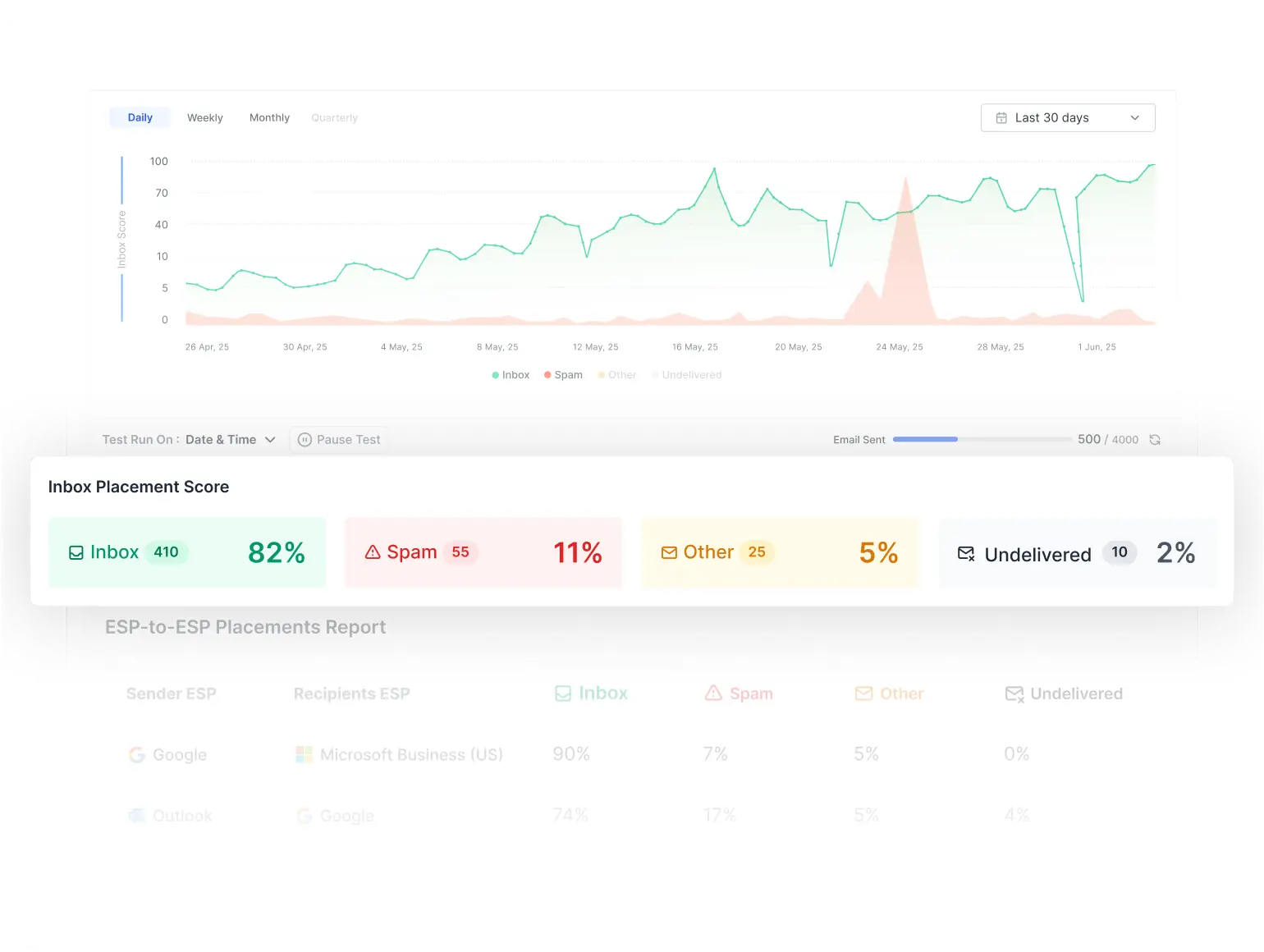
This section decides whether your outreach makes money or makes spam folders. Every sender above assumes you’ve done this. Most freelancers haven’t.
1. Buy a separate sending domain
Never send cold email from your main domain. If your site is janedesigns.com, buy a variant — janedesigns.co, getjanedesigns.com — for ~$12/year. If a mailbox gets flagged, you burn the spare, not your business.
2. Set up SPF, DKIM, and DMARC
Gmail, Yahoo, and (since May 2025) Microsoft all require SPF + DKIM + DMARC (policy of at least p=none, aligned) for bulk senders. Miss any and your mail gets rejected outright — not filtered, rejected. Your sending tool’s docs walk through the DNS records — about 20 minutes.
October 2026 news: Warmy’s Adeline is an AI deliverability agent that reads your SPF/DKIM/DMARC setup, sender reputation, and inbox placement — then tells you in plain language why your emails hit spam. The message is clear: in 2026, the winners aren’t the best writers, they’re the best-delivered.
3. Warm up for 14–30 days
A brand-new inbox suddenly sending 200 emails looks exactly like a spammer to Google. The consensus protocol:
| Week | Daily volume per inbox | What you’re doing |
|---|---|---|
| 1 | 5–10 | Warmup only — automated back-and-forth with the warmup pool |
| 2 | 10–20 | Warmup + a few real emails to people you know |
| 3 | 20–30 | Start your first small cold batch |
| 4+ | 30 max | Full campaigns; keep warmup running at ~15–20% volume |
Minimum 14 days of warmup; 21 is safer; brand-new domains get the full 30. Use 2–3 mailboxes per domain, keep bounce under 2%, and keep warmup running during campaigns.
4. Set up one-click unsubscribe
Google and Yahoo require one-click unsubscribe for bulk senders, and your spam complaint rate must stay under 0.3%. An unsubscribe link feels like giving up control — it’s what keeps you out of spam. Make it visible, honor it instantly.

How Do You Personalize Cold Emails With AI Without Sounding Like a Robot?
The rule I use: AI does the research, I write the sentence. Fully AI-written emails have a smell — vague flattery like “I came across your profile.” One genuine, specific sentence beats a polished generic email every time. Three prompts, in order:
Prompt 1: The research hook
Prompt 2: The first-line writer
Prompt 3: The follow-up writer
Before and after: what “good” looks like
(Illustrative example I wrote myself to show the technique — not an AI screenshot.)
Before (robot): “I came across your impressive profile and was blown away by your company’s innovative approach to digital solutions! As a top-rated freelancer, I help businesses like yours 10x their growth…”
After (human): “Saw you just launched the client portal rebuild — the onboarding flow looks sharp. I rebuild onboarding flows for SaaS teams; last one cut support tickets 31%. Worth a 15-min chat Thursday?”
29 words. References something real, states one result, asks for something small. That’s the whole game.

3 Cold Email Sequences You Can Steal This Week
Copy these, swap in your details, and send. Every sequence assumes your deliverability setup is done — if it isn’t, go back two sections.
Sequence 1: The 3-touch cold sequence (for new prospects)
Email 1 (Day 1):
Subject: quick question about [specific thing]
[First line — the specific observation from Prompt 2.]
I do [service] for [niche] — recently [one concrete result with a number]. Worth a 15-min call Thursday or Friday?
— [Your Name], [one-line credential]
Email 2 (Day 4): the value bump — two sentences, one new observation or link, one soft question, under 45 words.
Email 3 (Day 9): the breakup. Short, honest, and it routinely pulls the highest reply rate of any touch: “I’ll assume timing’s off and stop here. If [problem] becomes a priority, reply ‘interested’ and I’ll send two ideas — no pitch. — [Name]”
Sequence 2: The post-call follow-up (for warm leads)
Day 2: the recap you promised, plus one line tying their words to your proposal. Day 6: one nudge referencing the call. Day 12: “Should I close the file on this?” Silence after that means no.
Sequence 3: The 90-day re-engagement (for old “no’s”)
Once a quarter, email past “not right now” prospects: one genuine update on your work, one relevant observation about their business. Your old pipeline is the cheapest new business you’ll ever find.
Pair these with a solid proposal workflow — because when the replies come, you need to convert — and know your rate before you quote.
How Many Cold Emails Should a Freelancer Send Per Day?
Fewer than you think: 10–15 cold emails per inbox per day (30 max after warmup). With 2–3 mailboxes on your sending domain, that’s 600–900 prospects a month.
Do the math: 700 prospects × 3.43% = 24 replies. A quarter become calls (6); a third close (2 clients). Two clients a month from a $47 tool and an hour of prospecting a day. Send less, personalize more, follow up relentlessly.
The Rules: Don’t Burn Your Domain
Cold email is legal in the US under CAN-SPAM (truthful subject, real physical address, opt-out honored within 10 days). The EU is stricter — GDPR wants a legitimate-interest basis, and the EU AI Act expects disclosure of AI involvement in AI-generated outreach. My rules: business addresses only, one-click unsubscribe everywhere, never buy a list, suppress anyone who says stop — forever. Your domain reputation is an asset; treat it like your credit score.

What I’d Buy at $0, $50, and $150/Month
$0/month: trial-hop honestly — Instantly’s trial, Saleshandy 7-day, Woodpecker 14-day (no card on any), Apollo’s free credits, MillionVerifier’s 100 free credits. Enough to run one real campaign and learn whether cold email fits your niche before spending a cent.
$50/month: Saleshandy Starter ($34/mo annual) + the $12/year domain + MillionVerifier’s $39 one-time pack + Apollo free. The sweet spot.
$150/month: Instantly Growth ($47) + Apollo Basic ($49) + a second sending domain. Only spend this once email already produces calls — scale what works, don’t fund hope.
Know your real cost per client before you buy any tool
Everyone buys the shiny sequencer first and does the math never. So do the math before you spend a dollar. This is plain arithmetic, not a study — plug in your own numbers:
Cost per client = time per lead × your hourly rate × leads contacted ÷ clients won
Example with honest numbers: 15 minutes per lead (0.25 hr) × $40/hr = $10 per lead. At a 5% close rate you need 20 leads to win one client. Cost per client: $200 in your own time. Now you can actually compare that against a tool or a platform fee instead of guessing.
Then calibrate your expectations, because the averages are brutal. Prospeo’s 2026 cold-email roundup (analyzing roughly 14.3 billion cold emails) found global averages of ~42% open rate, ~3% reply rate, ~1% meetings booked, and a 7.5% average bounce rate. One email in five is never even opened by a human, and the bounce number is the silent killer — they flag anything above a 1.5% bounce rate as a broken data layer, because bad data torches your sender reputation before your AI subject line ever gets a chance.
Three findings from that roundup that changed how I run outreach:
- Data beats copywriting. The cheapest tool with verified data outperformed the fanciest sequencer on reply rate. Most freelancers overspend on the email writer and underspend on the list.
- Timing hooks beat problem hooks. Openers tied to a recent event (“noticed you just hired a VP of sales”) averaged a 10.01% reply rate vs 4.39% for problem-based openers. Your AI’s job: find the event, not invent the compliment.
- Cadence has a half-life. A 3-7-7 follow-up cadence captures 93% of replies by Day 10. And the safe ceiling is 15–20 emails per day per warmed inbox — volume comes from more warmed inboxes, not from cranking one account. Blast past that and you’re training spam filters, not finding clients.
So the order of operations: clean list first, timing hook second, sequencer third. Skip step one and you’re just paying $30/month to get your domain flagged faster.
(Facts verified on prospeo.io’s 2026 cold-email roundup.)
Frequently Asked Questions
Is cold email legal for freelancers?
In the US, yes — CAN-SPAM allows it with truthful headers, a physical address, and a working opt-out. In the EU/UK, GDPR and PECR are stricter: business addresses with a clear legitimate interest, always include unsubscribe, and note the EU AI Act’s disclosure expectation for AI-generated outreach. When in doubt, ask a local attorney — this isn’t legal advice.
Do I really need a separate domain for cold outreach?
Yes. It’s $12 a year and the highest-ROI insurance in this guide. Cold sending carries spam-complaint risk no matter how good your emails are; a spare domain keeps your main site, portfolio, and client email pristine.
What reply rate should a freelancer expect from cold email?
Benchmark against 3.43% (Instantly 2026), top senders above 5.5%. Under 2% after 300 sends means the problem is deliverability or list quality — not your writing. Fix targeting and authentication before rewriting copy.
Instantly or Saleshandy — which is better for freelancers?
Saleshandy if budget rules ($34/month annual, warmup included, no per-seat pricing). Instantly if you want scale (unlimited mailboxes and warmup, $47/month). Both beat Smartlead once you add its $59/month warmup add-on. Try both free trials; keep the one you actually enjoy opening.
Enjoying FreelancerTools guides?
Add us as a Preferred Source on Google — you'll see our latest tools and guides first in Search, Top Stories, and AI Overviews.
Get One Useful AI Tool Tip Every Week
One practical AI tool tip in your inbox every week. No spam, unsubscribe anytime.

We’re the team behind FreelancerTools. We hands-on test AI tools for freelancers — signing up for free plans, taking real screenshots, and fact-checking every claim before publishing. Our guides cover proposals, pricing, invoicing, and winning clients.